

How to Choose the Perfect Appointment Booking Software (Step-by-Step Guide)
Modern businesses cannot thrive without online scheduling software. Your competitors who offer round-the-clock booking convenience will leave you behind without it. Your business’s specific needs should drive the selection of appointment booking software, making the process straightforward.
Picking the right appointment system can transform your business. The system’s automated reminders can slash no-shows by up to 66%, which directly impacts your revenue.
Let us guide you through selecting appointment booking software that aligns with your business needs. We will help you make an informed decision by exploring scheduling requirements, automated reminder features, and integration capabilities.
Why Online Appointment Booking Software Matters
Online appointment scheduling has evolved from a luxury to a necessity in today’s digital world. Research shows 94% of corporate executives want unified platforms to integrate apps and automate processes. This demonstrates how simple scheduling has become essential for businesses of all sizes.
Save time and reduce no-shows
Numbers tell the story clearly. Businesses save an average of 15 hours monthly in administrative work by using an online booking system. Text message reminders can cut no-show rates by an impressive 38%.
No-shows create major problems across industries, and providers face an average no-show rate of 5-7%.
Appointment scheduling software solves these issues through automated reminders.

Customers can reschedule or cancel on their own, which helps businesses fill empty slots fast and avoid lost revenue. This boosts resource use and overall productivity.
Improve customer experience and retention
Customer needs have changed at their core. Research reveals 89% of people want to book appointments online or through mobile devices. About 60% of American consumers prefer to schedule appointments online.
You can’t overlook the convenience factor. Online booking lets customers control their scheduling at any time of day. They pick times and locations that suit them best, without your business hours limiting them. Research shows up to 34% of online appointments happen after regular office hours.

Self-service scheduling gives customers:
- Clear view of real-time availability
- Easy rescheduling without phone calls
- Quick confirmation and peace of mind
- Personal calendar integration
- Multiple ways to pay
These perks create a cycle of positive experiences. Satisfied customers come back and tell others about your business. Studies show 87% of clients feel more connected when you address their needs quickly.
Why Bookeo is a top choice for growing businesses
Bookeo shines among appointment scheduling solutions. Your business can take bookings 24/7. This round-the-clock availability keeps potential customers from going elsewhere when they can’t book.
Bookeo’s automated systems handle work that would need extra staff otherwise. The software sends customized confirmations, reminders, and follow-ups on its own. You save time while keeping steady contact with customers.
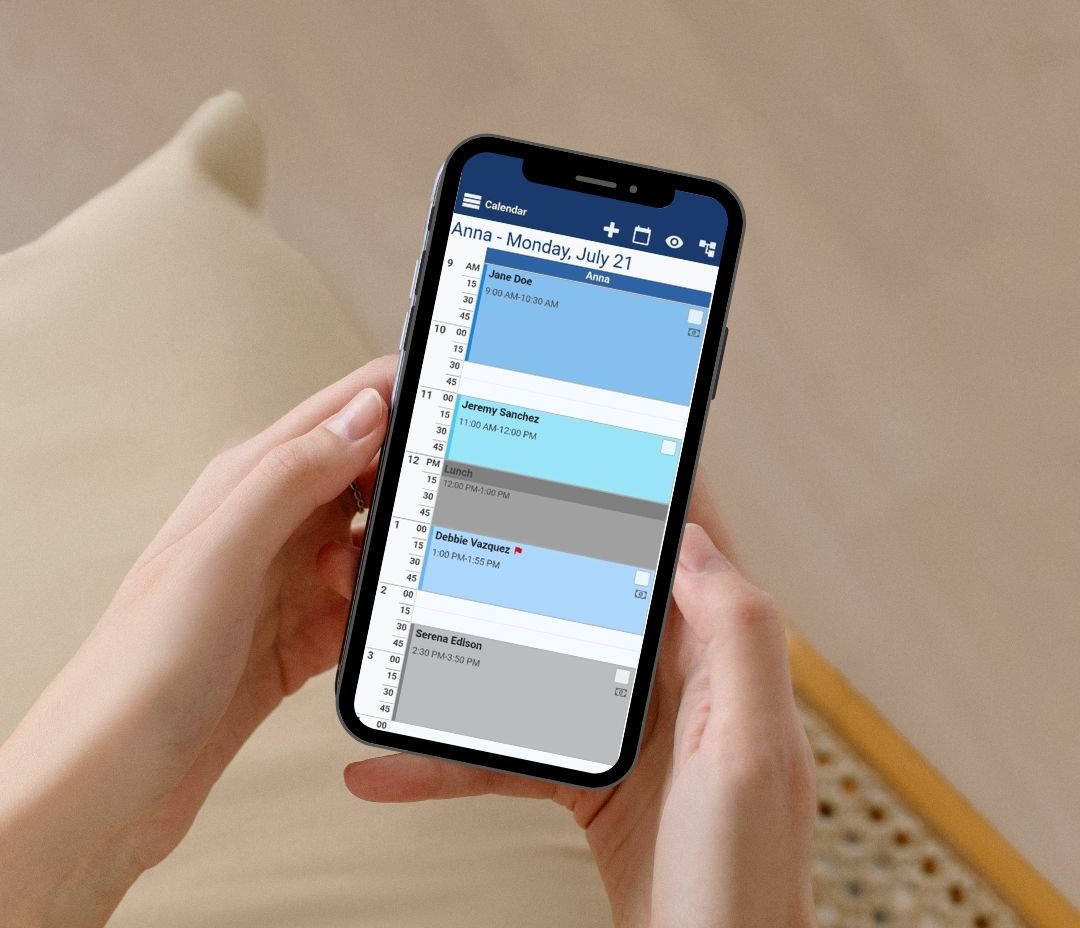
Bookeo’s scalability makes it valuable. The platform fits your needs whether you run a small studio or manage multiple locations. It works great for individual service providers, small businesses, multi-branch companies, and franchises.
A business using Bookeo sold 131 seats to 60 different users on day one with minimal calls needed. This shows how customers quickly embrace and value intuitive booking systems.
Beyond simple scheduling, Bookeo offers detailed reporting to track customer priorities and revenue. These informed insights help businesses fine-tune their marketing and make smart growth decisions.
The right appointment booking software does more than optimize operations; it changes how businesses connect with customers while improving profits through fewer no-shows and more bookings.
Step 1: Understand Your Business Needs
Let’s get into different appointment scheduling solutions by first looking at your business needs. This vital first step helps you pick software that fits perfectly with how your company runs.
Identify your appointment types and volume
What kinds of appointments does your business offer? Every business has unique scheduling needs. Make a list of your appointment scenarios before you pick any scheduling tool:
- Fixed time slots – appointments with standard durations (30, 45, 60 minutes)
- Custom duration options – clients can pick how long they need
- Recurring appointments – regular weekly or monthly bookings
- Single vs. group sessions – one-on-one appointments or group classes
- Multi-day or all-day events – longer appointments that run for hours or days
Your monthly appointment volume plays a big role in picking the right scheduling solution.

Research shows how appointment types affect customer satisfaction. More face-to-face appointments are linked to happier customers. Too many same-day appointments can actually make satisfaction rates drop. Pick software that supports the right mix of appointments for your business.
Think over your team size and locations
Team size has a huge effect on productivity and scheduling. Small teams often get more done. Teams with nine or more people are nowhere near as productive as smaller groups. Your scheduling software should work well with your team setup.
The International Software Benchmarking Standards Group says team size ranks among the top three factors that affect productivity. Pick software that works with your actual team structure instead of a one-size-fits-all approach.
Running multiple locations brings extra challenges. Businesses with several sites need scheduling software that can handle each location’s availability and resources separately but manage everything centrally. This becomes more important as your business grows.
Look at client expectations and booking behavior
Understanding clients’ preferred booking methods is essential. About 46% of appointments are now booked online. This shows people want to schedule things themselves. Software without self-booking options will turn away modern customers.
Booking habits have changed dramatically. Most people (82%) say they’re more likely to visit a business if they can book ahead. Even better, 78% tend to buy more when they get tailored service.

Booking patterns tell an interesting story. Clients often want to schedule outside normal business hours. That’s why Bookeo lets businesses take bookings 24/7.
Good appointment scheduling gives you a great way to get more from your resources while providing better in-person service. The right software turns browsers into buyers by respecting their time with simple booking steps.
Bookeo makes a difference by sending custom confirmations, reminders, and follow-ups automatically. This cuts down on office work while keeping communication steady. Plus, it works well for businesses of all sizes, from solo practitioners to multi-location operations.
Step 2: Look for Essential Booking Features
Your business needs should guide you to pick a booking solution with the right features. The best mix of features can make scheduling faster and keep your customers happy.
Online self-scheduling
Self-scheduling lets customers book appointments without staff help. This feature has grown more valuable as studies show 73% of people want to schedule their own appointments. Self-scheduling also helps health systems cut labor costs and boost customer satisfaction.
Customers can book any time of day with self-scheduling. Research shows almost 30% of these bookings happen outside business hours. Your business can capture more bookings that might slip away otherwise.
The ease of use makes a big difference. Phone scheduling usually takes over eight minutes with possible call transfers. Online booking takes less than a minute. This quick process leads to more appointments, businesses using online scheduling book 24% more appointments than those using phones alone.
Bookeo shines here by accepting bookings around the clock through websites and Facebook pages. The accessible interface helps customers pick time slots that work for them.
Real-time calendar sync
Calendar sync is crucial to any booking system that works. Live sync stops double bookings by updating availability on all platforms. This uninterrupted coordination saves time and prevents mix-ups that upset customers and staff.
Calendar updates might take time; some systems need up to two hours to refresh. The best booking platforms cut this delay.

The sync should work with many platforms. Good booking solutions connect with Google Calendar, Microsoft Outlook, and Apple iCloud Calendar. This flexibility works with whatever calendar system your business uses.
Advanced booking systems go beyond simple sync with custom options. You can control what information moves between calendars.
Recurring and group bookings
Recurring appointments make scheduling regular meetings easier. The system lets you create appointments that repeat daily, weekly, or monthly instead of making each one separately. This helps businesses with regular clients or team meetings save time.
Group booking lets multiple people book the same session at once. This works great for classes, workshops, or team meetings. The software should let you set participant limits and collect payments in one transaction.
Different platforms offer various group booking options. Some let you change appointment slots as needed, while others show complete session dashboards. The best solutions support different group appointment types:
- Series bookings – Book multiple sessions in one go
- Drop-in bookings – Join recurring sessions when needed
- Custom group sizes – Set specific participant limits
These features should top your list when choosing appointment booking software. A system with strong self-scheduling, live calendar sync, and adaptable recurring/group booking options creates the foundation for smooth appointment management.
Step 3: Evaluate Automation and Reminders
Automated reminders are changing the game in appointment management. Simple notifications can reduce no-show rates by up to 90% and boost your bottom line. Take a good look at automation features when you pick your appointment booking software.

Automated email and SMS reminders
Each reminder channel works differently. SMS reminders work better than other methods with open rates of over 90%, while emails see about 20% opens. People read text messages within three minutes, which makes them perfect for urgent notifications.
The timing of your reminders makes a big difference. A good strategy has:
- First reminder 5-7 days before appointment
- Second reminder 2-3 days prior
This multi-step approach gives clients several chances to confirm or reschedule and cuts down on accidental no-shows. You’ll get the best results by mixing channels, emails for longer messages, and SMS for quick updates.
Customizable follow-ups and confirmations
Personal touches make clients more likely to respond. Clients want to see their name, appointment details, and specific instructions. Look for booking software that lets you create custom templates for different situations.
Follow-up emails after consultations or appointments help you:
- Share extra information
- Offer useful resources
- Move leads through your sales funnel
No-show and cancelation handling
No-shows will happen even with the best system. The trick is handling them well. Start with clear cancelation rules that cover:
- When clients can cancel (like 24-48 hours notice)
- Fees for late cancelations
- What counts as an emergency
Put these rules in your booking process and reminder messages. Clear policies mean fewer problems when you need to enforce them.
Quick follow-up is key for last-minute cancelations. This keeps things friendly while getting clients back on your calendar.
Some businesses charge no-show fees from 50% to 100% of the service cost. Adding a discount for rebooking helps get clients back, even after paying a fee.
Bookeo has all the tools you need to handle cancelations and no-shows. Your calendar updates automatically when appointments change to avoid double-booking. The system keeps everyone in the loop with real-time updates.
The best automation tools work with your other software. Look for options that connect with your CRM, payment systems, and calendars.
Automated reminders and follow-ups free up your team to focus on great service instead of paperwork. This change makes your business run better and keeps customers happier, exactly what you want from booking software.
Step 4: Check Integration Capabilities
Integrations serve as the backbone of any working appointment booking system. You must check how your software options connect with your existing business tools. The right integrations create a unified workflow that saves time and cuts down manual data entry.
Payment gateway integrations
Payment gateway integrations matter just as much for appointment-based businesses. A smooth connection with trusted payment processors like Stripe or PayPal makes transactions easier while building client confidence. Most customers want multiple payment options, including popular choices like Apple Pay and Google Pay.
Bookeo provides payment processing options that let businesses collect deposits or full payments during appointment booking. Its payment gateway connections handle all financial aspects securely, so you can focus on delivering great service.
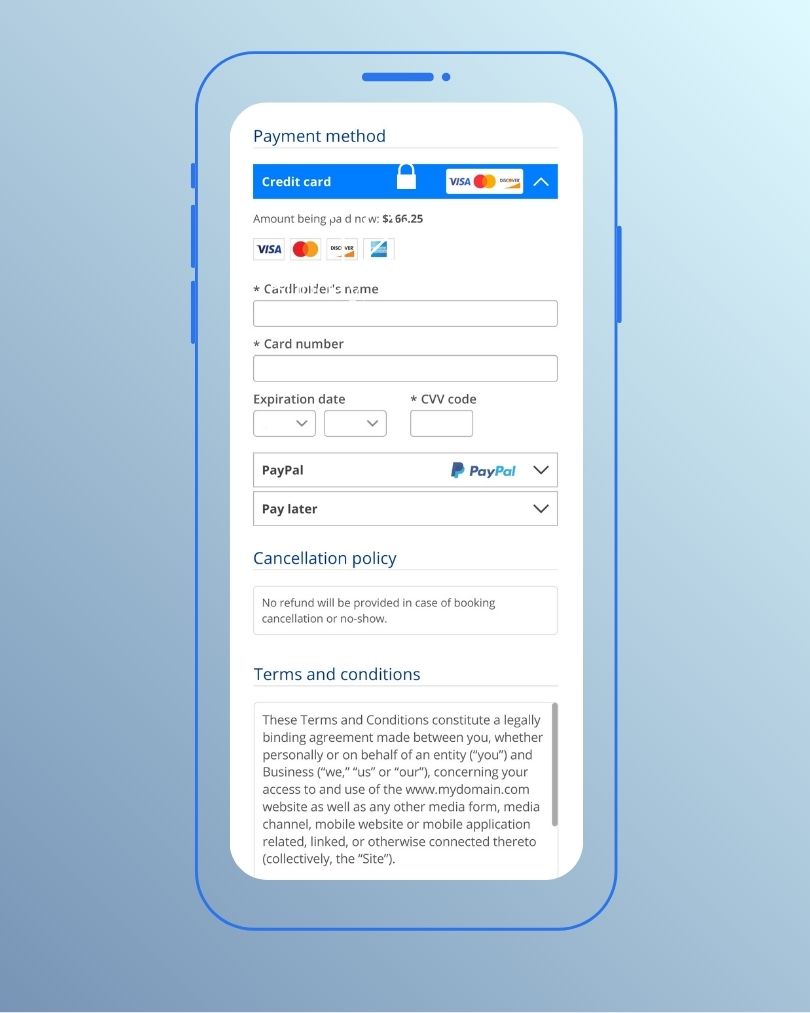
“Payment gateways process transactions instantly and automatically update your system, speeding up deposits, simplifying refunds, and streamlining daily reporting”. This automation becomes valuable especially when you have cancelations that might hurt revenue.
Video conferencing tools for virtual appointments
Virtual appointments have become crucial for many service providers. Quality booking software should combine smoothly with video conferencing platforms, such as Zoom, to aid online meetings.

The best integrations create meeting links automatically after booking confirmation. This removes manual setup work and lowers the chance of connection issues. Video conferencing integration creates a professional impression and expands your reach beyond local clients.
Marketing and email automation tools
Marketing automation integration takes your booking system’s capabilities further. These connections might seem optional at first, but they significantly improve client involvement and retention over time.

These integrations aim to create a cohesive ecosystem where your booking software works smoothly with other business tools.
Your choice of appointment booking software should connect with your essential business tools. The right integrations extend functionality beyond simple scheduling and turn your booking system into a central hub for client management, payments, communication, and marketing.
Step 5: Consider User Experience and Accessibility
Your booking software’s user experience directly affects client satisfaction. A study found that over 60% of digital interactions now happen through mobile devices. This makes an intuitive interface a must-have feature in appointment booking software.
Mobile-friendly interface
Smartphones now dominate online activity. Your booking solution needs excellent mobile functionality. Mobile optimization has become a requirement to capture bookings from clients who are always on the move. A mobile booking interface that works should have:
- Responsive design that automatically adjusts to any screen size
- Touch-friendly elements like large, easily tappable buttons
- Accelerated loading for clients with limited connectivity
- Optimized forms that minimize typing on mobile keyboards

Businesses with mobile-optimized scheduling see higher client involvement rates. Clients book appointments during commutes, lunch breaks, or other times when smartphones are their main connection tool.
Multi-language
Language support is a vital feature. Your booking system should support multiple languages if your business serves international clients or multilingual communities. Non-English speakers can then book services easily, which expands your potential client base.
Quality booking software goes beyond simple translation. It adapts date formats, currency symbols, and other regional priorities. These small details create a better experience for international clients.

Client self-service portals
Self-service portals have changed how clients interact with businesses. These platforms let clients manage their relationship with your company without needing staff help.
Through self-service portals, clients can:
- Book appointments at their convenience
- Make payments directly
- Check upcoming appointment details
- View their complete service history
Clients appreciate the freedom to handle these tasks on their own schedule. Research shows this independence removes booking barriers and builds loyalty.
These portals eliminate many administrative tasks for businesses. Staff can focus on delivering exceptional service instead of handling routine scheduling requests or payment processing.
User experience might seem less important than features right now. The truth is that your booking system’s availability often determines whether clients complete their booking or switch to a competitor with a simpler interface.
Step 6: Analyze Reporting and Analytics Tools
Reporting tools turn raw scheduling data into applicable business information. You can make better decisions about your appointment operations and spot areas that need improvement through analytics.
Track appointment trends and no-show rates
No-shows can lead to 3%-14% revenue loss, which hurts your bottom line. These metrics reveal patterns that help you tackle problems before they damage your business.
Quality booking software generates reports that show:
- Daily, weekly, and monthly appointment volumes
- Cancelation rates by service type and time slot
- Customer show rates with historical comparisons
- Appointment lead times (how far in advance bookings occur)

Research showed that AI-powered analytics cut no-show rates by 50.7% and reduced patient wait times by an average of 5.7 minutes. This proves how seeing the data alone streamlines operations and highlights why you need software with complete reporting features.
Monitor staff performance and revenue
Staff productivity metrics help create balanced workloads and optimize team schedules. Good reporting tools track:
Each team member’s appointment completion rates set realistic performance targets. On top of that, resource utilization reports reveal how busy your staff members are, which prevents scheduling too many or too few people.
Use data to improve scheduling efficiency
Informed decisions help fine-tune appointment scheduling for the best results. Analytics highlight inefficient scheduling patterns so you can adjust resource allocation.
Good workforce analytics predict future scheduling needs based on past patterns. This helps you prepare for busy periods with proper staffing levels, which cuts wait times and maximizes resource use.
Booking software with advanced reporting changes how you handle appointments.
Look beyond simple scheduling features when choosing appointment booking software. A solution with comprehensive analytics gives you the insights to improve operations, reduce no-shows, optimize staff scheduling, and boost revenue.
Step 7: Plan for Scalability and Support
Your appointment scheduling software needs to grow alongside your business. Smart companies choose flexible solutions that prevent system changes from getting pricey down the road.

Multi-location and multi-staff support
Successful businesses expand to new locations and bring on more team members. The right booking software lets you manage schedules from one central dashboard. Your staff can coordinate assignments whether they work in the office, remotely, or in different states.
The software you choose should offer these multi-location capabilities:
- Different work schedules for each location
- Staff sharing between locations to improve coverage
- Location-specific settings while you retain control
Customer support and onboarding help
Even easy-to-use systems need proper setup.
Look for these essential support features:
- Setup experts who know your industry’s challenges
- Simple configuration steps and setup templates
Companies succeed with new software by following well-laid-out onboarding steps. Many providers share training materials after the original setup to help your team’s skills grow.
Flexible pricing and upgrade paths
Your scheduling needs evolve with business growth. Make sure pricing plans scale without huge cost increases.

Quality providers typically include:
- Free trials lasting 14-30 days
- Plans based on features, locations, or staff size
- Custom options for high-volume users
Some vendors also provide setup packages for businesses that want quick implementation without technical hassles.
Some higher-tier plans should include advanced features you’ll need later, such as resource management and booking for multiple staff members.
Conclusion
The right appointment booking software can revolutionize your business operations. A simple seven-step approach will help you pick software that fits your needs perfectly. Start by looking at your business requirements – from appointment types to how clients book. Next, review key booking features like self-scheduling and calendar sync. Your third step should focus on automation tools that cut no-show rates and save staff time.
Your existing tools need smooth integration with the new software. User experience can make or break success – customers quit complex booking systems in seconds. Good reporting tools give you the insights to make your operations better. Pick a solution that can handle your growth with flexible pricing and support for multiple locations.
Bookeo shines among online scheduling software because it handles everything in appointment booking well. This platform lets clients book 24/7 through websites and social media. It sends automatic reminders and works great for both single users and multi-branch setups. Bookeo’s reporting tools help track booking patterns and make scheduling more efficient.
Self-service booking has become the lifeblood of modern business. Today’s customers want to schedule appointments whenever they want. Quality booking software cuts down office work and makes customers happier at the same time. A good system does more than manage appointments – it drives your business forward.
Note that the best booking software combines powerful features with easy-to-use design. Take your time to review options based on the steps in this piece. You’ll find a system that works now and supports your business growth down the road.