Grow faster and simpler with Bookeo Appointment Scheduling Software

From beauty salons to professional services, kids parties to spas, Bookeo’s online appointment scheduling helps you manage and grow your business. Grow revenue and focus on clients while Bookeo streamlines your scheduling, payments, staff rostering, waiver management, and more.
For 30 days. No credit card required.

Grow faster and simpler with Bookeo Appointment Scheduling Software

From beauty salons to professional services, kids parties to spas, Bookeo’s online appointment scheduling helps you manage and grow your business. Grow revenue and focus on clients while Bookeo streamlines your scheduling, payments, staff rostering, waiver management, and more.
For 30 days. No credit card required.
Easily set up Bookeo, then sit back while its all-in-one appointment scheduling and management software lets your clients book 24/7 from anywhere, processes payments, sends reminders, manages waivers, markets your business and much more, so you don’t have to.

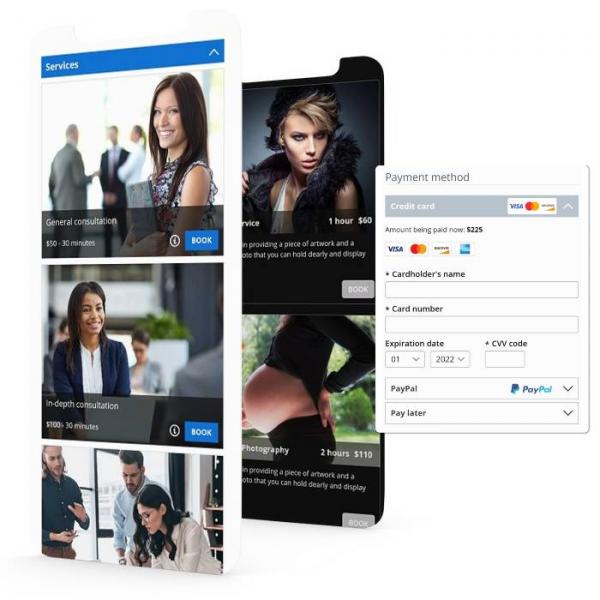
Let clients book appointments and pay 24/7 on any device

With Bookeo, your clients can quickly view your real-time availability, schedule appointments, and make payments anytime, anywhere, on any device.

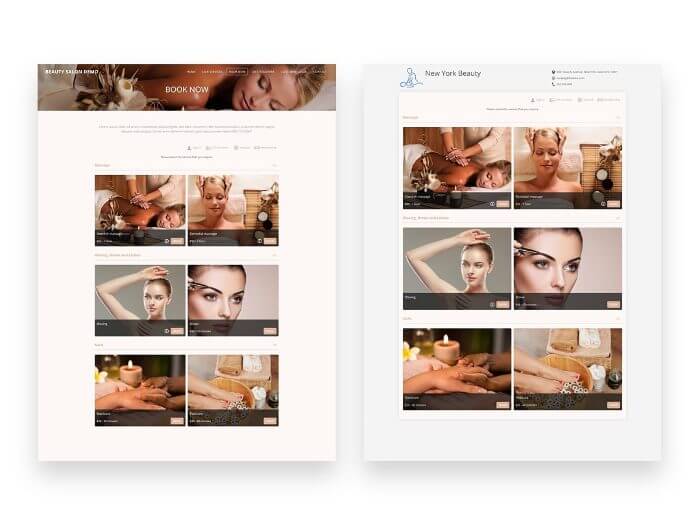
Boost conversion rates with an appointment booking page that you easily customize with your brand’s colors, layout and style.

Your choice: Website-integrated or standalone

Integrate Bookeo appointment scheduling system right into your website, or use our standalone page.

Website-integrated: Embed Bookeo’s widget into your website. Your clients stay on your site throughout the booking experience, with no pop-ups or overlays.

Standalone: Use Bookeo’s brandable appointment scheduling standalone, customized to fit your brand. Link to your unique booking URL on your site, in your email signature, business cards, and other online accounts.

Either way, your customers get a smooth appointment scheduling process that keeps them engaged.

Customize and automate client communications

  • BOOKING CONFIRMATIONS
    Have Bookeo send your branded, customized confirmations automatically with every appointment booking.
  • REMINDERS
    Reduce no-shows with automatic text and email reminders before appointments.
  • FOLLOWUPS
    Bookeo’s followup emails encourage customer reviews and feedback on third-party sites like your Google Business Profile or Facebook.
  • RESCHEDULING
    Let clients reschedule or cancel appointments online, hassle-free, without calling you.
Bookeo is reliable, professional, innovative and straightforward. The customer support is exceptional. My clients love using Bookeo and describe it as intuitive, awesome and easy to use.
Cathy Byers, Spring Massage Therapy

Finally, all your bookings and payments in one place

online payments
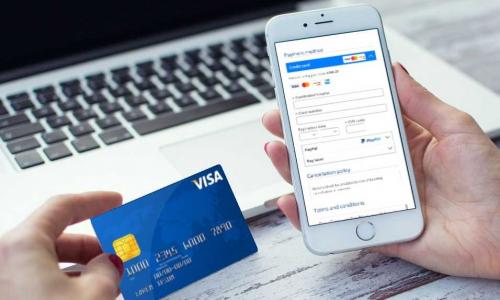
ONLINE APPOINTMENT BOOKINGS AND PAYMENTS
Your Bookeo dashboard keeps you informed and updated every time a customer books an appointment or pays online, adjusting availability in real time.
pos payment
In-store and phone bookings and payments
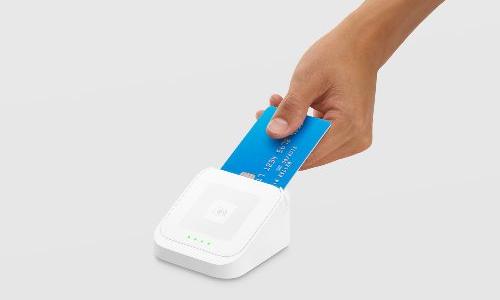
When a client taps or swipes a payment in-store, Bookeo’s integrated POS system automatically updates your dashboard. Record your in-store appointment bookings and payments with ease.

New Effortless waiver management with fully integrated digital waivers

Streamline your check-ins. Let customers sign waivers online before their appointment or in your shop using the Kiosk app. Signed waivers appear instantly on your dashboard and are automatically linked to customer profiles and bookings, making it easy to identify appointments with missing waivers.

Your staff are instantly alerted when a waiver is signed, and a digital copy is automatically sent to both the customer and staff members. 

Learn more →

Effortlessly organized calendar

Be perfectly organized and updated
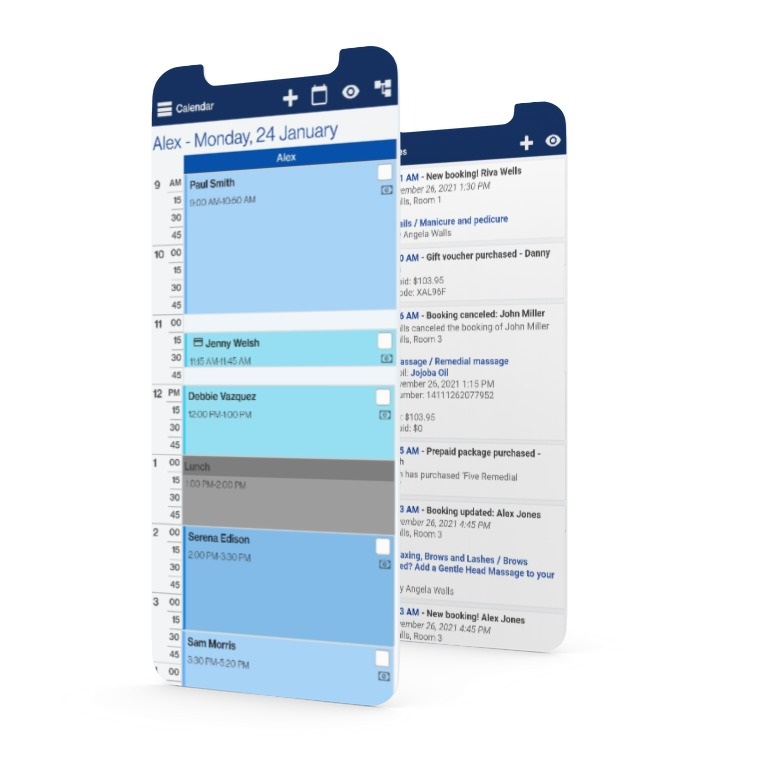
Say goodbye to double bookings and missed appointments. Bookeo’s appointment booking system can automatically send you a notification whenever an appointment booking is made, changed, or canceled.

Automatic calendar sync
Bookeo syncs seamlessly with Google Cal, iCal, Outlook, or Office 365 calendars, so you can access your schedule anytime, on any device. No more scribbled notes!

All your client info organized in one place

Organized client database
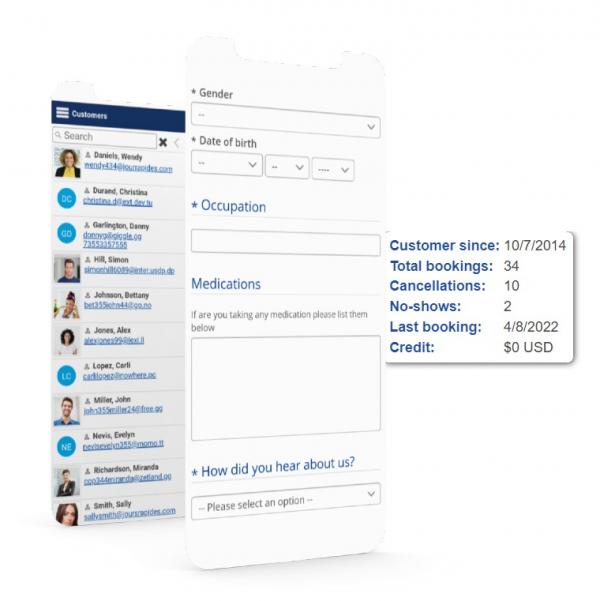
Easily access all of your client data, updated and neatly organized right in Bookeo’s appointment scheduling system. Quickly find contact info, appointment history, notes, and more, anytime, from anywhere.

Go paperless with intake forms
Bookeo’s integrated intake forms mean you can go paperless and let clients save their details to simplify their future appointment bookings.

Powerful marketing has never been simpler

Sell add-ons
Upsell your services with extras and optional products/services to help you generate more revenue from each appointment.

Integrated booking cart
Let clients easily book multiple appointments with Bookeo’s integrated booking cart, which makes booking appointments in bulk easier.

Solidify clients loyalty
Foster loyalty and keep your clients coming back time and time again with pre-paid service packages, memberships, gift certificates, and more.

Flexible appointment scheduling for your unique business

ADVANCED APPOINTMENT SCHEDULING

With Bookeo, you can set different durations and prices for your appointments. Even scheduling combined services and workshops are a snap.

One-click recurring bookings

Recurring appointment bookings? No problem. Your clients can easily book the same or varying days and times.

EFFORTLESS STAFF AND LOCATION ROSTERING

Staff your services with the right staffers, at the right time, in the right place. Assign staffers to specific services, and set working hours for each staffer and location.

Flexible appointment scheduling for your unique business

online calendar

ADVANCED APPOINTMENT SCHEDULING

With Bookeo, you can set different durations and prices for your appointments. Even scheduling combined services and workshops are a snap.

rostering

EFFORTLESS STAFF AND LOCATION ROSTERING

Staff your services with the right staffers, at the right time, in the right place. Assign staffers to specific services, and set working hours for each staffer and location.

mouse

One-click recurring bookings

Recurring appointment bookings? No problem. Your clients can easily book the same or varying days and times.

Save time with streamlined workflows

Focus on your clients while our appointment scheduling software streamlines your operations. Whether it’s payment gateways, POS systems, or other tools, you’ll love your new streamlined operations. Here are just a few examples.

Enabling scheduling for thousands of businesses

Our powerful yet user-friendly online appointment booking software is built around our client feedback about your needs.
In other words, we listen. That’s why thousands of businesses in over 120 countries and 35 languages trust Bookeo.

37 billion

client booking revenue

104 million

bookings processed

42 thousand

active users

Appointment scheduling tailored for your business

You’ll marvel at how customizable our appointment booking system is. Bookeo is the perfect flexible online scheduling software for beauty salons, kids’ parties, legal and medical professionals, photographers, car washes, therapists, and more.

Beauty Salons

Easily manage and grow your spa business with our spa scheduling software

Learn more →

Massage Therapists

Simplify and expand your massage business with our massage scheduling software

Learn more →

Consultations

Easily manage and grow your business with our appointment scheduling software

Get started →

Birthday parties

Simplify your life and grow your client base with our birthday party booking software

Learn more →

Hair Salons

Try the salon scheduling software that lets you easily manage and grow your business.
Learn more →

Barbers

Easily manage and grow your barber shop with our barber scheduling system

Learn more →

Nail Salons

Simplify your life and grow your client base with our salon scheduling software

Learn more →

Car Wash

Grow and easily manage your car wash business with our car wash booking system

Learn more →

Take Bookeo for a test drive

Try out a live demo to see how well Bookeo can streamline your operations, appointment scheduling, payment processing, automatic reminders, and more.

We're Here for You

Excellent customer support

We know that our success rests on your success. That’s why we’re totally dedicated to quickly help you with any questions about our online scheduling software.

Bookeo scales with you

Whether you’re a solo entrepreneur, multi-branch corporation, small salon, franchise, or anything in between, Bookeo scales to fit your needs beautifully.

Bookeo Rocks!

Check out these unsolicited industry reviews.

Try Bookeo free for 30 days

See for yourself how Bookeo beats the competition and helps you organize, simplify, and grow your business.
For 30 days. No credit card required.

FAQ

Running a service-based business means juggling your time, overseeing staff, and meeting client needs, all of which can be disrupted when someone doesn’t show up for their appointment. Missed bookings waste time, cut into revenue, and cause scheduling problems throughout the day. Bookeo helps ease this issue through a well-designed appointment scheduling software that supports smoother operations and better attendance.

  • Automated Appointment Reminders

Bookeo’s appointment booking software sends out appointment reminders by email or text automatically. Businesses have the flexibility to set their own reminder times. Email reminder messages include direct links, making it easy for clients to cancel, or reschedule with just one click. By cutting out the need for manual follow-ups, these reminders help reduce no-show rates.

  • 24/7 Client Self-Service

Clients can manage their bookings independently, whenever it suits them. Whether they need to cancel or reschedule, they can do it directly through the appointment scheduling platform – no need to contact your staff. This level of access not only adds convenience for clients but also helps reduce no-shows and missed appointments.

  • Upfront Payments Increase Attendance

Requiring prepayments or deposits fosters a stronger sense of commitment. Bookeo’s appointment scheduling software makes it easy to implement these payment policies. You can choose to mark deposits as non-refundable, helping to enforce your cancellation policies and safeguard your time against last-minute changes.

You have full control over how payments are handled. Clients can pay in full, leave a deposit, or pay later, depending on your preferred setup. You can also send payment requests, issue refunds, and track manual payments like cash or direct transfers. Additionally, you can connect two payment gateways simultaneously, such as Stripe and PayPal, to provide your clients with more flexibility at checkout.

With these tools in place, Bookeo’s appointment scheduling software helps simplify your payment system and make things run more smoothly, for both you and your clients.

  • Transparent Cancellation Policies

Clients are shown your cancellation and rescheduling terms upfront at the time of booking. This clear communication sets expectations from the start, minimizes confusion, and makes it easier to enforce your policies and hold clients accountable when necessary.

  • Data-Driven Insights to Improve Scheduling

Bookeo’s appointment scheduling solution tracks booking patterns and shares helpful reports on client behavior. You can identify which time slots often get skipped, find clients who cancel frequently. With this insight, you can fine-tune your reminders, payment settings, and scheduling process to reduce missed appointments.

By combining automation, 24/7 access, and useful data, Bookeo’s appointment scheduling software supports more reliable attendance and smoother daily operations, giving you more control over your time and service delivery.

Adding appointment scheduling to your website using Bookeo’s appointment scheduling software is simple, practical, and doesn’t require technical skills. Whether you’re working on your own or leading a larger team, Bookeo gives your clients the ability to book appointments through your site, any time, from any device.

  • Embed a Booking Widget with Minimal Effort

Integration begins with a simple copy-and-paste of a small HTML snippet into your website. The embedded widget can be customised toadapt to your site’s design, maintaining visual consistency and reinforcing brand trust. The booking widget is fully compatible with major website builders, including WordPress, Wix, Squarespace, Weebly, and Shopify. Moreover, its responsive design ensures seamless booking from smartphones, tablets, or desktops.

  • Use a Hosted Booking Page When a Website Isn’t Available

If you don’t have a website, Bookeo’s appointment scheduling software has you covered with a hosted booking page. You can customize your booking page with your logo, brand colors, and even a unique web address. Share it through social media, emails, or your Google Business listing. This option is ideal for businesses that attract clients through various online platforms but prefer to avoid the hassle of creating a full website.

  • Customize the Booking Experience to Match Your Business Needs

Bookeo provides you with plenty of control over how your schedule. You can adjust availability by staff, service, or location. Bookeo supports a wide range of booking types, including one-on-one, semi-private, and virtual appointments. You can also add buffer times between sessions. Want to offer add-ons, promote special deals, or implement tiered pricing? That’s all built in as well.

  • Enable Secure, Upfront Payments During Booking

To reduce missed appointments, Bookeo’s appointment scheduling software lets you take payments at the time of the booking. Bookeo integrates with major payment systems, including Stripe, Square, and PayPal. You can charge in full or just take a deposit, and you can add taxes or extra fees if needed. This makes things easier for your team and smoother for clients.

  • Advanced Tools for Greater Flexibility and Control

If your business has tech staff or more advanced needs, Bookeo has tools to help. You can use its API, webhooks, and support for third-party plugins. You can also link it to tools like Google Analytics and Facebook Pixel. Once it’s set up, Bookeo handles appointments and payments, saving your team time and improving the experience for your clients.

Once configured, Bookeo provides a professional and reliable appointment scheduling system for managing appointments, collecting payments, and optimizing scheduling workflows, freeing your team from manual coordination and allowing you to focus on delivering exceptional service.

  • Digital waiver management

Bookeo’s appointment booking software lets customers sign waivers online before their visit or in-store using the Kiosk app. Once submitted, waivers instantly appear on your dashboard and are automatically linked to customer profiles and bookings. Staff are notified in real time when a waiver is signed, with digital copies automatically sent to both the customer and your team, ensuring everything stays organized and check-ins run smoothly.

Appointment scheduling can benefit virtually all kinds of businesses of all sizes. However, service businesses that rely on client appointments would benefit the most from using Bookeo, including businesses in the following industries:

  • Beauty and wellness: appointment scheduling software can help beauty and wellness businesses (hair salons, spas, massage therapists, etc.) to enable online appointment booking and manage their schedules.
  • Service businesses: salons, nail salons, cleaning, consulting, pet grooming, and other professionals can use appointment scheduling software to take appointments 24/7, keep track of appointments, and manage their schedules. This can help reduce double bookings and no-shows, improving client satisfaction.

Bookeo’s online appointment scheduling system is highly versatile and easy to use, even for clients and staff who aren’t tech-savvy. Your clients will love being able to easily book, reschedule, and cancel their appointments at their convenience 24/7 without needing to call or visit you.


To get started with Bookeo’s appointment scheduling software, you can follow these steps:

  1. Sign up for an account: visit Bookeo’s website and click on the “Free Trial” or “Try For Free” buttons to sign up for an account.
  2. Add your business details: add your business details, such as business name, address, phone number, and URL, to your account.
  3. Add services: add the services you are going to offer so clients can book appointments for these services. Specify which days and times you are available to see clients for each service. Set your services description and upload images and videos that showcase your services.
  4. Add your staff: if you have any staff members, you’ll need to add them to your account so they can access Bookeo to view and manage appointments.
  5. Create a booking page: you can create a standalone appointment booking page or embed this page on your website. You can customize the colors and style of the booking page to match your brand’s identity.
  6. Integrate payment gateways: if you want to accept online payments, you can integrate one of the supported payment gateways to the booking page.

Voila! Now your Bookeo page is set up, and you are ready to accept online appointment bookings 24/7.


Bookeo is a powerful appointment booking solution that can help you increase your business’s appointments with a plethora of marketing features, including:

  • Upselling: easily upsell your services by offering extra products or services at the time of booking. For example, if you are a hair salon business, you could offer a discount on your blow dry service for clients who just booked a haircut.
  • Promotions: run promotions via Bookeo to attract new clients and encourage existing clients to book more appointments.
  • Prepaid packages: sell prepaid packages of services through Bookeo. Meaning, clients can pay for a set number of appointments in advance.
  • Gift vouchers: offer gift vouchers when clients book your service via Bookeo, or sell the vouchers in-store to drive additional revenue for your business.