Golf scheduling software as powerful as you are

Whether you are a solo golf coach, manage a small school, academy or a franchise, Bookeo handles your bookings and helps your business grow. While you inspire your students to reach their fullest potential and improve their game.
For 30 days. No credit card required.
Bookeo is your all-in-one 24/7 golf lesson booking system. We’ll take care of online booking, scheduling, reminders, payments, marketing and coaches’ management.

Get bookings and payments 24/7

Let students view your real-time availability, book their golf lessons and make payments anytime, anywhere, on any device with our golf scheduling software.

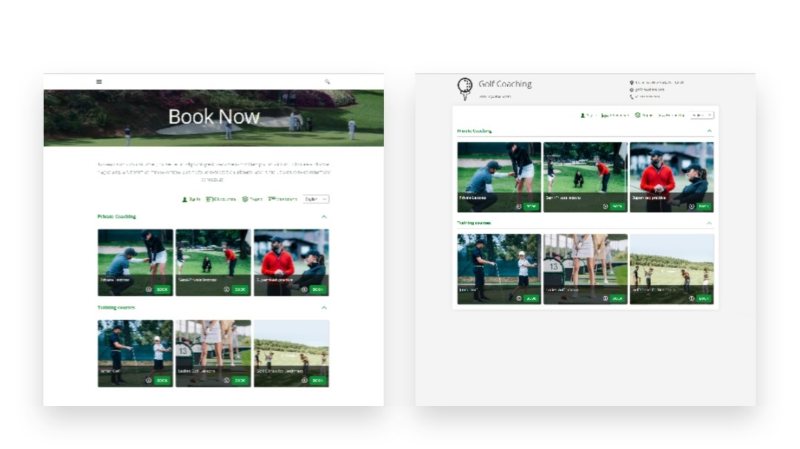
Increase conversions with an elegant booking page from one of our customizable layouts. Choose colors and styles to fit your brand.

Website-integrated or standalone

Embed Bookeo’s widget into your website, to let students book golf lessons without leaving your website, and without pop-up windows or overlays.

Or use the standalone brandable booking page provided by Bookeo. Simply paste your unique booking page URL into your email signature, business card, and online accounts.

Offer golf coaching services that will get you more clients

Streamline and automate your operations

  • BOOKING CONFIRMATIONS
    Send automatic branded and customized booking confirmation emails to your students.
  • REMINDERS
    Reduce costly no-shows with automatic email and text reminders before your golf lessons.
  • FOLLOWUPS
    Send automatic follow-ups to collect students’ feedback or reviews on third-party sites like Facebook, or Google.
  • ONLINE RESCHEDULING
    Let customers reschedule and cancel their bookings online with our golf lesson booking software.
Even though I was really small at the start, Bookeo was affordable and easy to use. It met my needs but also allowed me to grow.
Nichole Churchill

See all your bookings and payments in one place

online payments
Online bookings and payments
Whenever customers book and pay for their golf lessons online, your Bookeo calendar automatically updates with all the booking and payment details.
pos payment
In-person bookings and payments
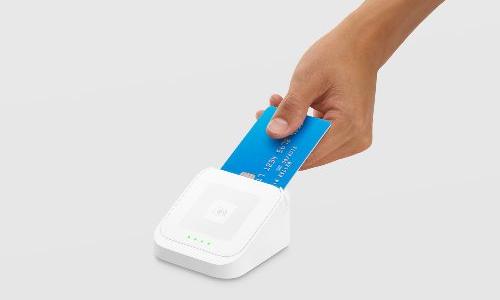
In-store, on-the-go tap and swipe payments automatically display in your dashboard with our integrated POS payment system. Easily record walk-in or phone bookings and payments in our golf lesson booking software.

Maximize profit with online reviews

Save time with automatic follow-up emails after your golf lessons and ask your students to rate their experience, or publish positive reviews on your website, social media profiles, or an online review aggregator.

Offer discounts to customers who refer your services to their friends and family.

Welcome to your organized calendar

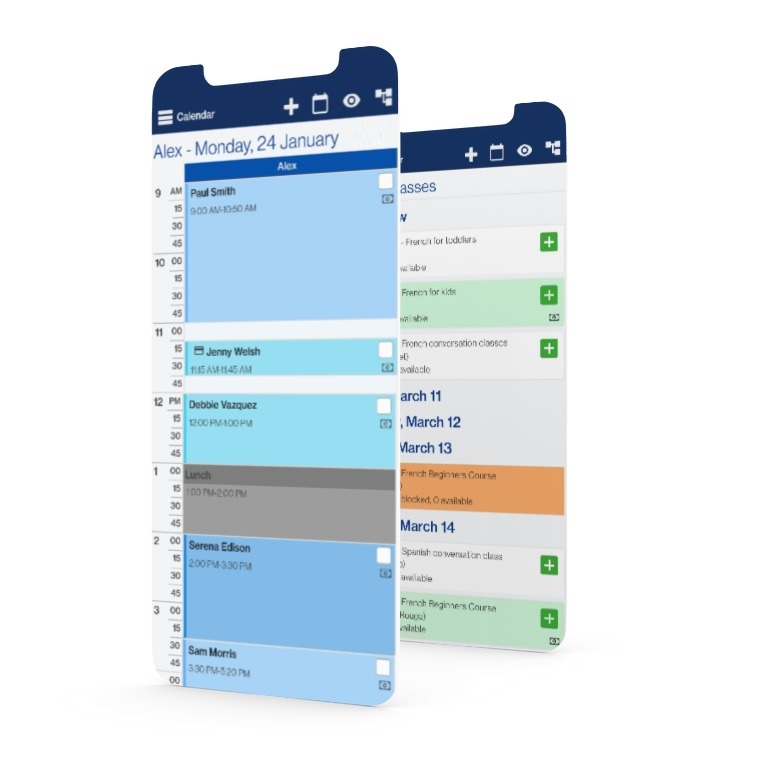
No more double bookings or costly no-shows with Bookeo’s golf scheduling software. Check your lesson schedule, bookings and mark attendance anywhere, anytime.

Get notified whenever a lesson is booked, changed or cancelled. Get up-to-the-minute updates with your personal Google Cal, iCal, Outlook or Office 365 calendar.

Finally, an organized student database

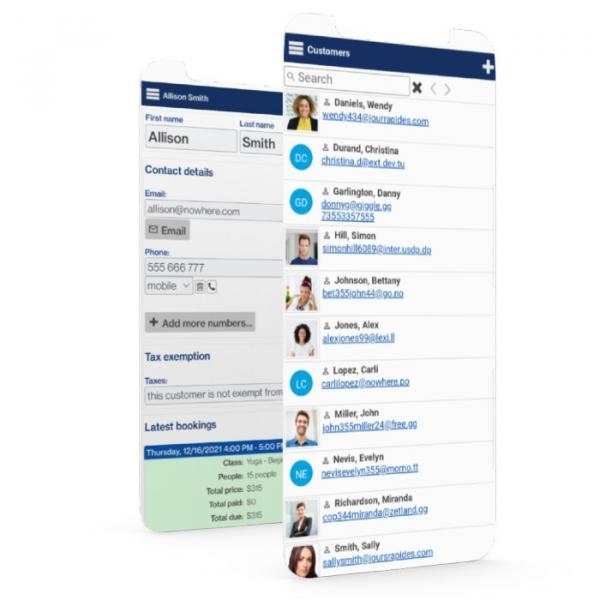
All of your student information is always organized and up-to-date with Bookeo’s golf  lesson booking software. Easily view students’ bookings, class passes, and memberships, anywhere, anytime.

Go paperless with integrated intake forms. Let students save their details to speed online checkout for future golf lessons.

Maximize profits

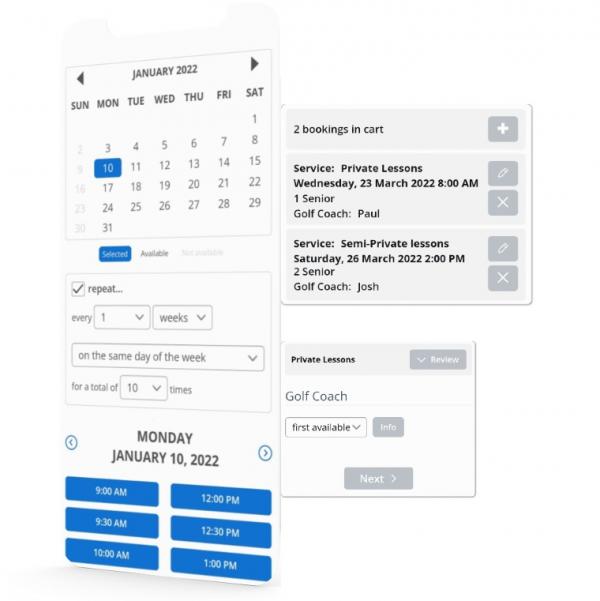
Let customers easily book recurring golf coaching sessions – for the same or varying days and times of the week. Let them select their preferred golf coach.

Let students register for multiple lessons with the integrated booking cart. Offer waiting lists with automatic notifications when series and programs are sold out.

Solidify student loyalty

OFFER MEMBERSHIPS

Earn recurring income with memberships. Set special prices for members and members-only golf lessons.

launch PROMOTIONS

Boost registrations with targeted promotions during slower periods or when launching a new golf class.

SELL PREPAID PACKAGES

Get paid upfront with lessons passes. Your customers will love saving on the cost of casual lessons.

Solidify student loyalty

membership icon

OFFER MEMBERSHIPS

Earn recurring income with memberships. Set special prices for members and members-only golf lessons.

prepaid icon

SELL PREPAID PACKAGES

Get paid upfront with lessons passes. Your customers will love saving on the cost of casual lessons.

sale icon

launch PROMOTIONS

Boost registrations with targeted promotions during slower periods or when launching a new golf class.

Try a live demo now

See how Bookeo can simplify your life with scheduling lessons, payments, rescheduling, client reminders and more.

Powering scheduling for thousands of businesses

We’ve been working closely with our clients to build Bookeo’s powerful yet user-friendly golf lesson booking software for businesses like yours. Since then, we’ve grown to serve thousands of businesses in more than 120 countries in over 35 languages.

37 billion

client booking revenue

104 million

bookings processed

42 thousand

active users

Connect the tools you already love

Bookeo’s golf lesson scheduling software connects seamlessly with the software and solutions tailored to your business. Here are just a few examples.

We’re here to help you

Outstanding Customer Service

Our customer service representatives are the best in the industry. We want you to get the most out of our golf lesson booking system. We’re here to help whenever you need it.

Bookeo scales with you

No matter how big or small your business, our golf scheduling software scales to your needs comfortably. Bookeo’s golf lesson booking software is perfect for golf coaches, golf schools and academies, franchises, and everything in between.

Bookeo Rocks!

Check out these unsolicited industry reviews of our golf lesson booking system.

Start your free 30-day trial today

Take a test drive and see for yourself how our golf scheduling software can help you organize, automate and grow your golf coaching business.
For 30 days. No credit card required.

FAQ

A golf scheduling software helps you run your golf coaching business by streamlining and automating various operations. It automates and improves day-to-day operations, such as bookings, scheduling and payments, automatic reminders, managing golf coaches, and marketing your golf coaching business.

Automating these business processes with a golf lesson booking software saves time and improves efficiency, allowing you to focus more on golf coaching, customer relationships and growing your business.

An online golf scheduling software collects and stores data for you and lets you access it 24/7, from any device. You can also opt to restrict access to authorized staff members and golf coaches, and set which bookings each staff member can see and manage.

A golf lesson booking software lets you and your staff focus on your students and grow your business instead of spending time on the phone and on repetitive manual administrative tasks. It helps reduce double-bookings and no-shows, automatically sends email and txt reminders to your students, and allows you to securely collect golf bookings and payments online and in-store.

An online golf scheduling software also lets you customize the availability of your golf coaches with the days and times each teacher is available and blocking out days when they take time off. In addition, you and your staff members can sync your golf scheduling software calendar with your personal calendars, like Google Calendar, Apple Ical and Outlook.

With Bookeo, you can offer private and semi-private coaching, series and programs, clinics and camps – for example, during school holidays.

Bookeo is an all-in-one golf lesson booking software with all the features you need to efficiently run your golf coaching business. Our golf lesson scheduling software makes it easy to manage booking, scheduling, golf coaches, and payments so you can simplify and automate your daily operations.

Bookeo is extremely flexible and easy to use for your golf coaches and your students. Your Bookeo dashboard displays up-to-date bookings so you can keep track of your daily golf coaching business schedule and never miss a beat.

Your clients will love being able to book, cancel, and reschedule their own bookings online 24/7 without having to call you.

To get started with Bookeo’s golf lesson booking software, sign up for a free 30-day trial account – no credit card is required. Add your business details, golf lessons and private lessons. Set your classes description and upload images and videos that showcase them. 

To accept bookings, you can use Bookeo’s customizable booking page or you can integrate the Bookeo widget on your website, so your students can book golf lessons right from your website – without overlays or popups. 

For a professionally branded booking experience, you can customize the colors and style of your booking page to match your logo and website and also select one of Bookeo’s gorgeous booking page layout templates. 

If you want to accept online payments for golf classes, simply integrate one of the supported payment gateways.

Now Bookeo’s golf scheduling software will take bookings for you, 24/7. 

Bookeo’s golf scheduling software offers powerful integrated marketing features that help you get more bookings and grow revenue.

Use our golf lesson scheduling software to easily upsell your golf lessons with add-ons.

Run promotions when you launch a new golf class, or during slower days and times of the week.

Sell prepaid service packages (such as 5 golf lessons at the price of 4) which offer more value for your clients while allowing you to get paid upfront. Prepaid service packages also help build customer loyalty, increasing repeat visits.

Offer memberships to earn recurring income. Set membership rates with single or automatic recurring payments. Set special prices for members and members-only classes.

Sell gift vouchers online and in-store to boost sales and drive additional revenue for your business.

FAQ

A golf scheduling software helps you run your golf coaching business by streamlining and automating various operations. It automates and improves day-to-day operations, such as bookings, scheduling and payments, automatic reminders, managing golf coaches, and marketing your golf coaching business.

Automating these business processes with a golf lesson booking software saves time and improves efficiency, allowing you to focus more on golf coaching, customer relationships and growing your business.

An online golf scheduling software collects and stores data for you and lets you access it 24/7, from any device. You can also opt to restrict access to authorized staff members and golf coaches, and set which bookings each staff member can see and manage.

A golf lesson booking software lets you and your staff focus on your students and grow your business instead of spending time on the phone and on repetitive manual administrative tasks. It helps reduce double-bookings and no-shows, automatically sends email and txt reminders to your students, and allows you to securely collect golf bookings and payments online and in-store.

An online golf scheduling software also lets you customize the availability of your golf coaches with the days and times each teacher is available and blocking out days when they take time off. In addition, you and your staff members can sync your golf scheduling software calendar with your personal calendars, like Google Calendar, Apple Ical and Outlook.

With Bookeo, you can offer private and semi-private coaching, series and programs, clinics and camps – for example, during school holidays.

Bookeo is an all-in-one golf lesson booking software with all the features you need to efficiently run your golf coaching business. Our golf lesson scheduling software makes it easy to manage booking, scheduling, golf coaches, and payments so you can simplify and automate your daily operations.

Bookeo is extremely flexible and easy to use for your golf coaches and your students. Your Bookeo dashboard displays up-to-date bookings so you can keep track of your daily golf coaching business schedule and never miss a beat.

Your clients will love being able to book, cancel, and reschedule their own bookings online 24/7 without having to call you.

To get started with Bookeo’s golf lesson booking software, sign up for a free 30-day trial account – no credit card is required. Add your business details, golf lessons and private lessons. Set your classes description and upload images and videos that showcase them. 

To accept bookings, you can use Bookeo’s customizable booking page or you can integrate the Bookeo widget on your website, so your students can book golf lessons right from your website – without overlays or popups. 

For a professionally branded booking experience, you can customize the colors and style of your booking page to match your logo and website and also select one of Bookeo’s gorgeous booking page layout templates. 

If you want to accept online payments for golf classes, simply integrate one of the supported payment gateways.

Now Bookeo’s golf scheduling software will take bookings for you, 24/7. 

Bookeo’s golf scheduling software offers powerful integrated marketing features that help you get more bookings and grow revenue.

Use our golf lesson scheduling software to easily upsell your golf lessons with add-ons.

Run promotions when you launch a new golf class, or during slower days and times of the week.

Sell prepaid service packages (such as 5 golf lessons at the price of 4) which offer more value for your clients while allowing you to get paid upfront. Prepaid service packages also help build customer loyalty, increasing repeat visits.

Offer memberships to earn recurring income. Set membership rates with single or automatic recurring payments. Set special prices for members and members-only classes.

Sell gift vouchers online and in-store to boost sales and drive additional revenue for your business.

Yes. Bookeo’s golf lesson scheduling software is designed to accept online payments and deposits directly during the booking process, making it simple for students to secure private lessons, group clinics, or training programs instantly. With Bookeo’s golf lesson booking system, players can view real-time lesson availability, book sessions online, and pay from any device, anytime. All bookings and payment activity, both online and in person, are managed in one centralized dashboard, giving golf professionals a clear, real-time overview of schedules and revenue.

To process online payments, Bookeo integrates with reliable and widely used payment gateways. The system works seamlessly with providers like Stripe, Square, and PayPal, allowing golfers to pay securely with credit or debit cards at checkout. This creates a smooth booking experience while ensuring payment data is handled securely through trusted platforms.

Bookeo also offers flexible deposit and payment options tailored to golf lesson scheduling. Instructors can choose to require full payment upfront, collect a partial deposit, store a card to guarantee a booking, or allow reservations without immediate payment. Additional options, such as “pay later” and an online balance payment, let students complete remaining payments before their lesson. Depending on the selected payment gateway, payments can be completed directly on the booking page or through a secure hosted checkout.

For golf academies and instructors who take payments on-site, Bookeo’s integration with POS systems like Square enables tap-and-swipe transactions at the driving range, golf studio, or clubhouse. In-person payments automatically sync with online transactions in the same dashboard, making reconciliation and reporting straightforward.

Finally, Bookeo’s golf lesson booking software does not charge extra commission on payments. You only pay the standard processing fees required by your chosen payment provider, helping golf instructors and training centers maximize revenue while managing lesson scheduling and payments in one streamlined system.

Yes. Bookeo’s golf lesson scheduling software includes automated reminders and notifications designed to reduce no-shows and keep both players and instructors informed throughout the booking process. Once a golf lesson is booked, the golf lesson booking system automatically sends a confirmation message, followed by reminder notifications via email or SMS/text before the lesson takes place. These reminders help players remember their scheduled lessons and arrive on time, prepared to train.

All reminder and notification settings are controlled from Bookeo’s administrative dashboard. Golf instructors and training facilities can enable email notifications, choose exactly when reminders are sent, and customize the message content to match their brand. Email reminders can include your logo, lesson details, contact information, personalized instructions, and links to your website or social channels. SMS/text reminders can also be activated, allowing you to decide how far in advance golfers receive a short, mobile-friendly alert.

In addition to player communications, Bookeo’s golf lesson scheduling software sends automatic notifications to instructors and staff. When a lesson booking is created, changed, rescheduled, or canceled, the system can notify the relevant team members by email or text. This real-time visibility helps instructors stay aware of attendance, lesson availability, and schedule updates without manual follow-ups.

Branding and customization are built directly into Bookeo’s reminder system. The golf lesson booking platform allows you to tailor the design and layout of notifications to reflect your golf academy or coaching brand. Messages can also be customized for different lesson types, programs, or skill levels, ensuring clear and consistent communication for every booking.

By combining automated confirmations, reminders, and staff alerts, Bookeo’s golf lesson scheduling software helps minimize missed lessons, reduce last-minute changes, and eliminate scheduling confusion. Keeping golfers informed and instructors up to date leads to more reliable attendance, smoother daily operations, and more predictable revenue for golf professionals and training centers.

Bookeo’s golf lesson scheduling software is built with enterprise-level security to protect player information, instructor data, and online payments throughout the entire booking process. The platform operates on a PCI-DSS–compliant hosting environment designed for reliability and uptime, with multi-layer server redundancy, automatic data replication, and geographically distributed data centers to keep golf lesson bookings running without interruption.

To ensure data protection and availability, Bookeo continuously replicates information in real time across multiple mirrored servers. In addition to live replication, multiple independent backup snapshots are created every day and stored in separate cloud locations. This setup provides golf instructors and training facilities with strong data resilience, fast recovery options, and long-term system reliability.

All communication between your golf lesson booking system and Bookeo is secured using SSL/TLS encryption (128-bit or 256-bit), the same standards used by major financial institutions. This encryption protects data while golfers browse lesson availability, submit bookings, and complete payments online, preventing unauthorized access.

For payment security, Bookeo supports encrypted online payments while remaining flexible with payment gateway integrations. The platform is fully PCI-DSS compliant and undergoes daily security checks by an independent, PCI-approved provider. Golf professionals can require full prepayment for lessons, accept deposits, or securely store a card to guarantee a booking. Where supported by the payment gateway, card details can be saved for future bookings to simplify repeat lesson scheduling.

Bookeo also includes robust administrative security controls. Account owners can enable multi-factor authentication (MFA), enforce strong password policies for instructors and staff, and activate anti-phishing features such as branded security images in automated emails. These tools help protect against unauthorized access, account misuse, and fraudulent activity.

Together, these security measures make Bookeo a reliable golf lesson booking and scheduling software, designed to safeguard sensitive data across every step of lesson scheduling, payment processing, and day-to-day management.

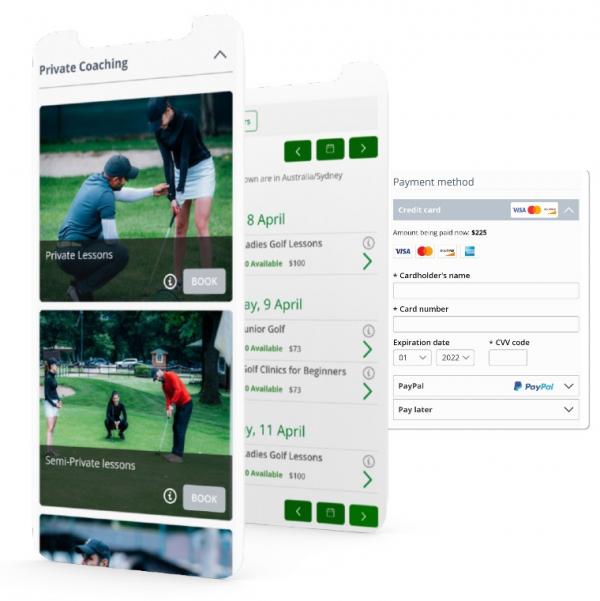
Yes. Bookeo’s golf lesson scheduling software is designed to work seamlessly on mobile phones, tablets, and desktop computers, delivering a consistent experience for both golfers and instructors. From the player’s perspective, the golf lesson booking system shows real-time lesson availability and allows bookings to be made anytime, from any device. Whether someone books from a smartphone or a desktop at home, the booking process remains fast, clear, and easy to complete.

Golf instructors and training facilities can embed Bookeo’s booking widget directly into their website or use a dedicated hosted booking page. In both cases, the interface automatically adjusts to different screen sizes, providing a clean, branded booking experience that is fully optimized for mobile users without any extra setup.

Bookeo does not require a separate mobile app. The golf lesson booking software automatically detects mobile devices and delivers a layout optimized for touch interactions and smaller screens. For instructors and administrators, the mobile experience includes the same essential tools available on desktop. You can view and manage lesson schedules, track bookings, update client information, and access account settings directly from a phone or tablet, making it easy to manage lessons while on the move.

This responsive, device-aware design enables mobile golf lesson bookings by default while maintaining a consistent experience across all platforms. As a result, Bookeo helps golf professionals capture more bookings, simplify scheduling, and stay flexible, no matter how or where clients choose to book.


Bookeo does not require a separate mobile app. The golf lesson booking software automatically detects mobile devices and delivers a layout optimized for touch interactions and smaller screens. For instructors and administrators, the mobile experience includes the same essential tools available on desktop. You can view and manage lesson schedules, track bookings, update client information, and access account settings directly from a phone or tablet, making it easy to manage lessons while on the move.

This responsive, device-aware design enables mobile golf lesson bookings by default while maintaining a consistent experience across all platforms. As a result, Bookeo helps golf professionals capture more bookings, simplify scheduling, and stay flexible, no matter how or where clients choose to book.


Yes. Bookeo’s golf lesson scheduling software is designed to automatically prevent double bookings and scheduling conflicts. As golfers book lessons, Bookeo updates your availability in real time, so once a lesson time slot is reserved, it is immediately removed from availability for other players during that same period. This keeps your lesson calendar accurate across both your embedded booking widget and hosted booking page.

Bookeo also includes an additional safeguard to prevent the same golfer from booking two golf lessons at the same time. This optional setting can be enabled by Bookeo’s support team and works by identifying clients by their email address. If a player attempts to book a second lesson that overlaps with an existing booking, the system blocks the reservation and displays an error message before confirmation.

Together, these features make Bookeo a dependable golf lesson booking and scheduling system. By eliminating overlapping reservations and conflicting lesson times, Bookeo helps golf instructors maintain clean schedules, reduce administrative effort, and ensure smooth, uninterrupted lesson operations.