

How to Choose Yoga Booking Software That Actually Fits Your Studio
Yoga studios rely on group classes rather than open memberships like traditional gyms. This difference means you need specialized software to manage scheduling, memberships, payments, and communication.
This piece walks you through exactly what to look for when selecting yoga class scheduling software that fits your studio’s specific needs and budget.
Understanding Your Studio’s Unique Business Model
Your business model determines which features you’ll use daily. A studio that offers only Vinyasa flow classes needs different software capabilities than one running hot yoga, restorative sessions, and aerial yoga at the same time.
What types of classes will you offer
Class variety affects your booking system requirements in ways you might not expect. Studios offer multiple formats to serve different student needs and fitness levels.
Power-based classes like Vinyasa and Power Flow attract students who seek strength building and cardiovascular benefits. These sessions move at a steady pace and require booking software that handles higher attendance volumes. Restorative formats focus on floor postures to stretch major muscle groups. They appeal to clients recovering from injuries or managing desk jobs. Specialty classes introduce equipment or specific techniques. Sculpt & Flow combines yoga with weight training and requires class descriptions that communicate what students should bring. Chair Yoga serves people with mobility limitations and needs different capacity settings than mat-based sessions.

Your yoga class scheduling software must accommodate varying class descriptions, durations, and capacity limits. A 90-minute workshop needs different settings than a 45-minute express class. Studios running 6-10 different class types need software that lets students filter by style, difficulty level, and instructor priorities.
Membership vs. drop-in pricing structures
Pricing structure affects which booking system features matter most. Most studios offer three pricing tiers to capture different customer segments.
Drop-in rates work well for newcomers, occasional practitioners, and travelers. These single-class purchases require simple payment processing without recurring billing. Class packages provide middle-ground options for students who attend regularly but aren’t ready for monthly commitments. A 5-class pass might be priced at $70 when single sessions cost $17. Studios offer 5-class, 10-class or 20-class bundles with expiration dates that range from three months to one year.
Monthly memberships provide revenue stability. The eight-session rule offers a pricing framework: if single classes cost $17, monthly unlimited memberships should price around $136. This gives frequent students substantial value while securing a predictable income. Membership packages often include perks beyond class access: guest passes, workshop discounts, and retail discounts.
Your online yoga studio software needs to handle all three pricing models at the same time. Students at different commitment levels should be able to book easily through the same system.
Online, in-person, or hybrid offerings
Hybrid yoga classes combine in-person instruction with live online streaming. Students can participate either in the studio or remotely. This format expanded as studios adapted to capacity restrictions and student priorities for flexibility.
A hybrid class is a single session that accommodates both in-studio and online students at the same time. The goal is to deliver consistent instruction and engagement to both groups. Hybrid classes expand reach by connecting with local students returning to the studio and remote participants worldwide. They remove studio capacity constraints and create potential for increased revenue streams.
Studios running hybrid formats need booking software that distinguishes between in-person and virtual attendees. Capacity limits differ: physical space might accommodate 15 students while online spots remain unlimited. Payment processing should work the same for both attendance types, but check-in procedures differ.

Virtual class pricing runs lower than in-person rates. This reflects reduced studio costs. But quality hybrid experiences require stable internet connections, proper camera positioning, and clear audio equipment.
Additional services like workshops and retreats
Workshops and retreats create supplementary revenue beyond regular classes. These offerings require different operational handling than drop-in sessions.
Workshops run 2-6 hours and focus on specific techniques like inversions, arm balances, or meditation practices. Pricing ranges from $45 to $150 per participant, depending on duration and instructor expertise. Retreats represent multi-day experiences that combine yoga instruction with accommodations, meals, and location-based activities. Three to five-day retreats cost between $1,500 and $4,000 per attendee.
Retreats aren’t just about teaching yoga. You’re managing group travel and building experiences that hold space for transformation. Successful retreats define specific audiences and intentions. Some focus on physical breakthroughs through strength and adventure. Others emphasize deep rest and healing through meditation and gentle movement.
Your booking system needs to handle workshop registrations with different pricing tiers, early-bird discounts, and deposit options. Retreat bookings require payment plans, room type selections, and longer booking windows than regular classes.
Essential Features Every Yoga Booking Software Needs
All-in-one studio management platforms handle every operational process through a single dashboard, from class scheduling to payment processing. Certain core capabilities matter more than bells and whistles when evaluating yoga booking software.
Class scheduling and calendar management
Scheduling tools help yoga studios manage class schedules while preventing overlaps or conflicts. Your booking system yoga needs should have color-coded calendar views for quick visual scanning. Studios benefit from seeing bookings at a glance through daily or weekly displays.
Drag-and-drop functionality simplifies rescheduling. You can move calendar tiles and adjust appointment times without manual data entry. Recurring class schedules eliminate repetitive setup work. Create a Monday evening Vinyasa class once, and the system populates future weeks automatically.
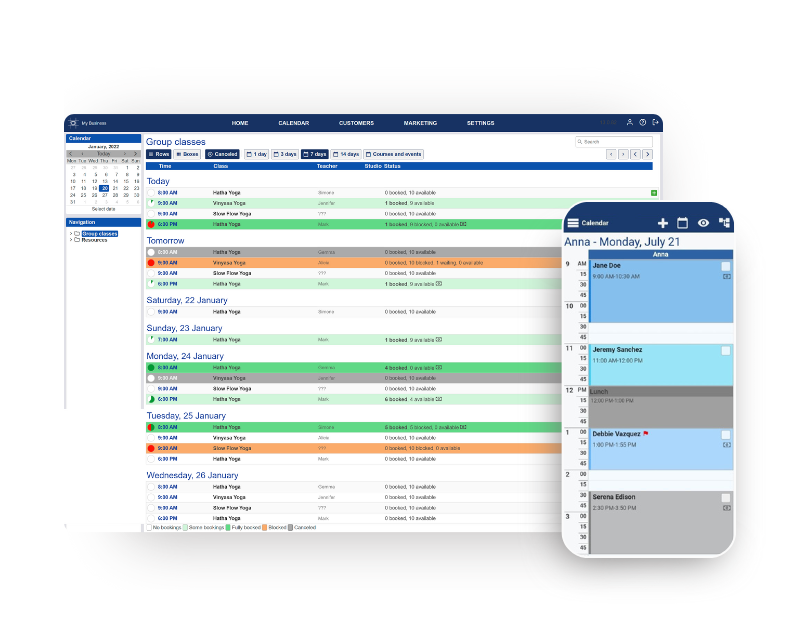
Capacity limits protect both student experience and instructor effectiveness. Set maximum participants for each class type. The system automatically closes bookings once classes reach capacity. Studios can assign specific instructors to sessions, add workshops among regular classes, and manage private appointments through the same calendar interface.
Student self-registration capabilities
Self-service systems let clients book classes 24/7 without phone calls or emails. Students access their personal information, register for classes, view schedules, and manage bookings independently. This accessibility removes barriers for people with busy schedules who plan yoga sessions late at night or early in the morning.
The registration process follows a straightforward path. Students log in to the system, select their desired term or time period, browse available classes, and add sessions to their schedules. They can modify bookings as needed, drop classes, and print their schedules directly from the platform.
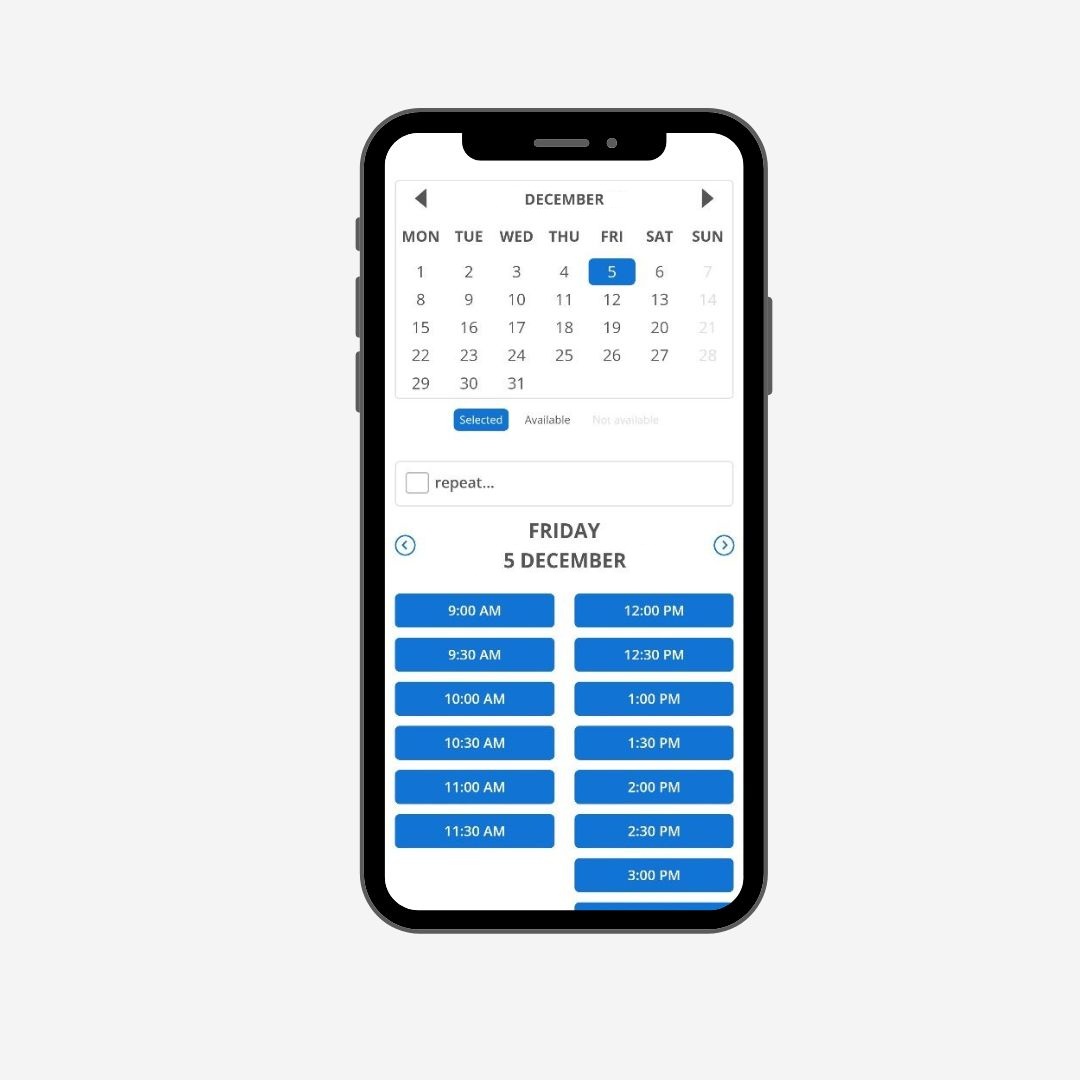
Immediate availability updates on all platforms prevent confusion. The system reflects that change instantly on your website, mobile app, and admin dashboard when someone books a spot. Cancelations free up spots for other students right away.
Payment processing options
Payment integrations should be flexible. Stripe, Square, and PayPal remain standard options and allow clients to complete transactions in a few clicks when booking. Modern systems support credit cards, debit cards, and digital wallets.
Bookeo’s yoga scheduling software has built-in tools to sell class packages, memberships, gift vouchers, and promotions through the same online booking system. Prepaid class packs work like digital credits. The system applies the pass and deducts sessions from their balance automatically when students book eligible classes.
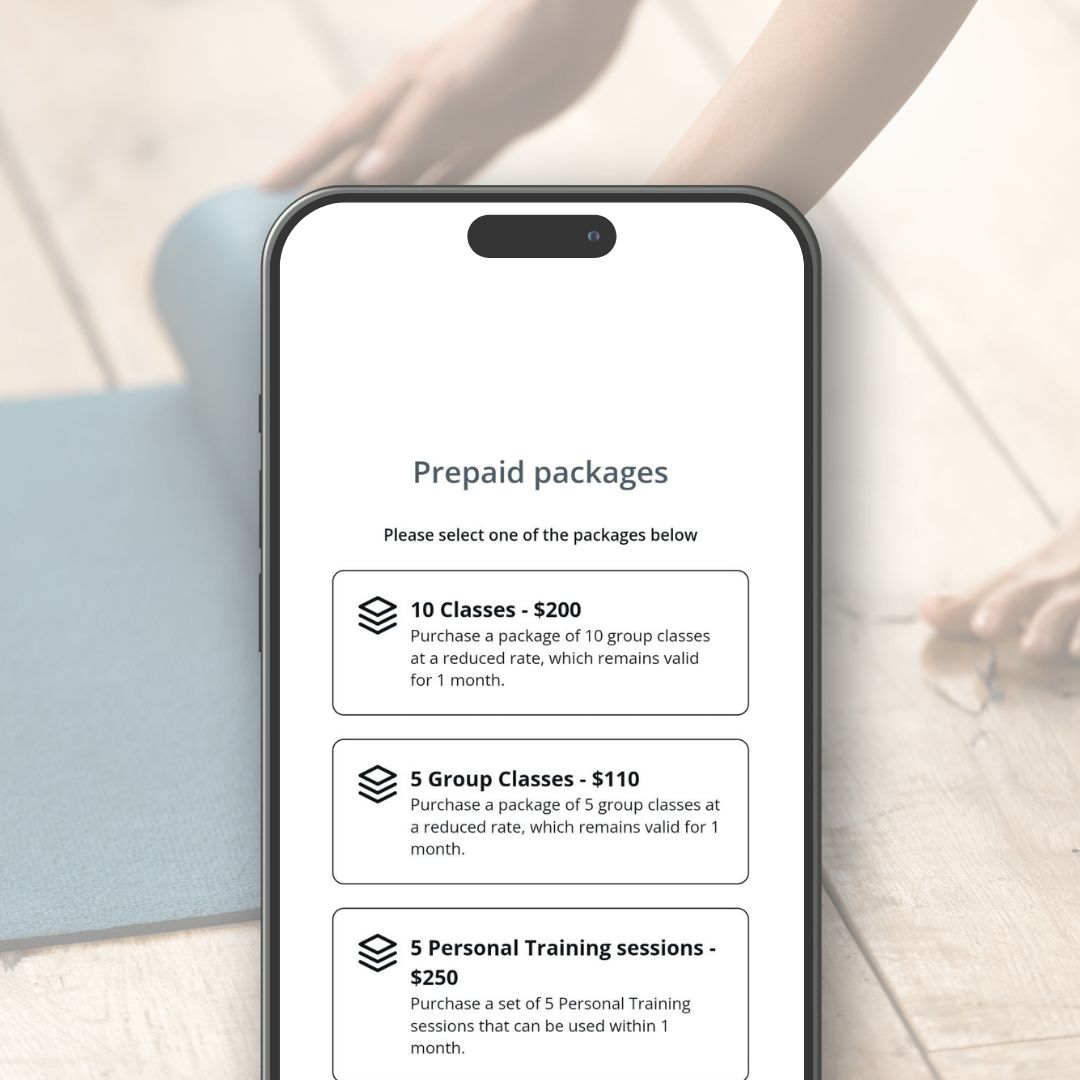
The software records transaction history, simplifying financial reconciliation. Every transaction gets tracked without manual work. Payment dashboards provide visibility into monthly revenue trends, popular membership plans, and pending payments.
Recurring billing capabilities matter for membership-based studios building predictable revenue. Systems should track remaining sessions and enable ongoing billing without manual intervention.
Automated email notifications
Automated reminders reduce no-shows and fill classes faster. Studies show businesses implementing automated scheduling notifications experience up to a 25% reduction in administrative time spent on schedule management. Some organizations report reducing no-shows and tardiness by up to 35% with timely reminders.
You should send up to 2 reminders via email and text messages at intervals before appointments begin. Customize notification templates for each event type and incorporate your branding elements. Messages should have student names, class times, studio addresses, or video links for virtual sessions.
Confirmation emails trigger when students complete bookings automatically. Reminder notifications are sent 24-48 hours before scheduled sessions, typically. Systems can also automate communications for schedule changes, cancelations, and payment confirmations.
Waitlist management
Waitlists are automatically activated once classes reach full capacity. Modern platforms also automatically move students up the waitlist and notify them instantly when spots become available. This happens without staff intervention and fills last-minute cancelations efficiently.
The system manages waitlists on a first-come, first-served basis. The next person in line receives a notification to claim the available spot when someone cancels.
Waitlist policies need clear communication. Document your approach and share it on your website, booking confirmation emails, and in person. Enforce these policies consistently after that. Making exceptions trains your community that policies are optional.
A healthy waitlist signals studio success, but only with proper management. Automated systems handle the complexity while keeping fairness and transparency for all students.
Ease of Use for Both Students and Teachers
User experience separates functional booking systems from ones students actually want to use. Software packed with features means nothing if your clients struggle through confusing interfaces or teachers spend hours managing simple tasks.
Simple booking process for clients
Friction during booking affects revenue directly. Students abandon complicated registration flows, even when they genuinely want to attend your classes. Given that 84% of appointments now start on mobile devices, your booking process must work flawlessly on screens of all types.
Systems that work provide 24/7 self-service booking on any device. This removes barriers for students planning sessions outside business hours. The process flows smoothly: students visit your booking page, select their desired class, choose an available time slot, and receive instant confirmation. Custom booking pages for each class type prevent confusion about what students are signing up for.
Instant confirmations matter more than many studio owners realize. Students need verification that their spot is secured right away. Automated confirmations reduce anxiety and prevent double-bookings when students wonder if their registration actually went through.
Accessible interfaces make the difference between completed bookings and abandoned carts. Students should navigate your system without instructions or support calls. The booking page displays available classes clearly, shows capacity in real time, and processes payments in a few clicks. Systems update availability across all platforms instantly. This prevents the frustration of booking a full class.
Admin dashboard functionality
Teachers and studio managers need quick access to operational data without clicking through multiple screens. Color-coded calendars provide visual clarity and let you distinguish between class types, instructors, and booking status at a glance.
Dashboards should display bookings, memberships, revenue, and attendance metrics through a single interface. This consolidated view eliminates switching between separate systems for scheduling, payments, and student management. You can track which classes fill consistently, identify slow periods, and spot revenue trends without exporting spreadsheets.
Managing daily administrative tasks becomes straightforward when dashboard design prioritizes clarity over complexity. Drag-and-drop functionality lets you reschedule appointments by moving calendar tiles rather than editing multiple fields manually. Changes appear across student-facing platforms and internal systems immediately with real-time updates.

Dedicated portals streamline operations further. Member portals allow students to update their own information, view class history, and manage bookings without staff intervention. Staff portals give instructors access to their schedules, student lists, and attendance tracking tools.
Pricing Models and What You’re Actually Paying For
Pricing structures vary wildly across yoga booking software platforms. Direct comparisons become difficult. Monthly subscription fees represent just one piece of the total cost puzzle.
Monthly subscription costs
Subscription pricing spans an enormous range based on features and scale. Budget-friendly options start at $35.00 per month for single-instructor studios. Mid-tier platforms charge $99.00 to $199.00 monthly. Enterprise solutions command $349.00 to $699.00 or higher for studios that need advanced features and multiple locations.
Per-staff pricing models offer predictable scaling. Flat recurring costs provide budget predictability, especially when you have slower months. But you’re paying whether you process ten bookings or two hundred.
Transaction fees and payment processing
Payment processing fees consume profit margins month after month. Standard rates hover between 2.6% and 2.9% per transaction across most platforms. These percentages exclude flat per-transaction fees.
To name just one example, processing a $185.00 monthly membership at 3% costs $5.55 per member. With 150 members, that totals $832.50 monthly or $9,990.00 annually. That number grows when you factor in drop-in classes and workshops.
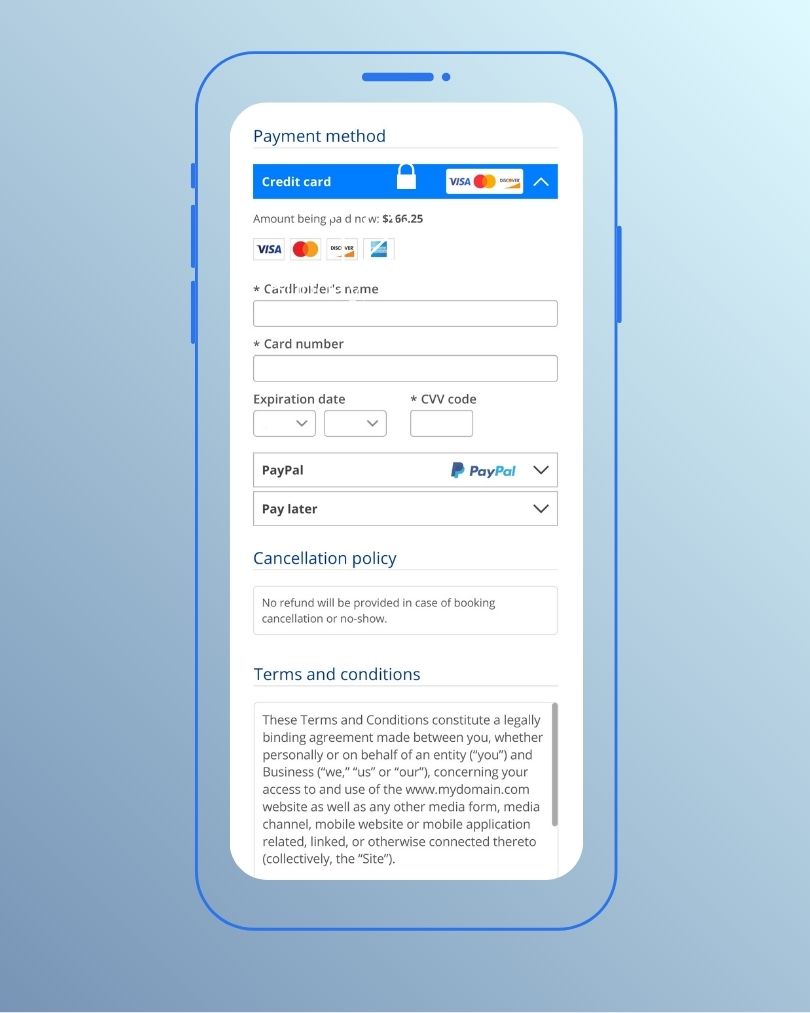
Standard credit card processing through integrations like Stripe, Square, or PayPal runs 2.9% plus $0.30 per transaction. Some platforms bundle processing into their pricing. Others require separate payment processor accounts with individual fee structures.
Hidden costs to watch out for
Beyond headline pricing and processing percentages, additional fees accumulate. PCI compliance fees range from $5.00 upward monthly or quarterly to maintain payment security standards. These mandatory charges support data security and industry compliance requirements.
Minimum monthly fees apply even when you process low transaction volumes. Chargeback fees of $20.00 hit your account whenever customers dispute transactions. Failed payment fees, account management costs, and software update charges appear on billing statements without prominent disclosure.
The real price of yoga class scheduling software has monthly subscriptions, processing percentages, per-transaction flat fees, and ancillary charges. A platform advertised at $89.00 monthly can run $200.00-plus in practice after you factor in processing fees and add-ons. Calculate your total cost of ownership by adding base fees, expected transaction volumes at stated processing rates, branded app costs if desired, and migration expenses before you commit to any platform.
Integration and Technical Requirements
Connected systems determine how well your yoga booking software works within your broader business operations. Isolated platforms create data silos and force manual work between systems.
Email marketing platform connections
Marketing automation separates studios that fill classes from those constantly chasing bookings. You can create campaigns based on purchase history and visit patterns. This lets you send targeted promotions to attract and retain clients.

Website integration options
Three main methods exist to connect booking systems to your website. The quickest way uses a button linking to a third-party hosted page. This works for smaller studios with limited development resources and provides the fastest route to online bookings. But users leave your website, limiting control over branding and user experience.
Widget embedding offers a middle ground. Many providers supply embeddable widgets or iframes displaying availability on your site without redirects. This keeps users on your website and improves trust and conversion rates. Performance depends on the provider’s code quality.
API integration delivers complete control. Some platforms provide APIs allowing full booking functionality integration into your website. You control the whole user experience from date selection to reservation confirmation. This option requires substantial development time and cost, ranging from a large upfront investment to ongoing maintenance as APIs change.
Accounting software compatibility
Xero and QuickBooks stand as the recommended accounting software for yoga studios. The platforms handle simple accounting operations and help business owners without accounting backgrounds keep operations running smoothly. Many studios use POS systems to track sales and payments, which works well from a bookkeeping perspective.
Payment gateway options
Stripe provides developer-friendly documentation and competitive pricing at 2.9% plus $0.30 per transaction. The platform has built-in fraud protection and supports 135-plus currencies. Direct bank integration is available.
PayPal offers wide customer recognition and trust with similar pricing to Stripe. Express checkout options and built-in dispute resolution streamline operations.
Your transaction volume influences the ideal gateway choice. High-volume businesses benefit from Stripe’s scalability, while small businesses appreciate Square’s simple approach. International customer bases find value in PayPal’s global recognition.
Customer Support and Onboarding Process
Support quality determines whether switching to new yoga booking software succeeds or becomes a months-long headache. Technical issues arise during implementation. Staff needs training. Data migration requires careful handling.
Live support availability
Response times matter. AI-powered support available 24/7 in multiple languages powers some platforms. These systems resolve common inquiries about bookings, schedules, and passes without human intervention, cutting manual support needs by up to 59.3%. Context-aware AI agents can handle 79.3% of support tickets related to bookings and registration errors. Studios using automated support combined with human backup achieve customer satisfaction scores of 4.7 out of 5.
But human support remains valuable for nuanced situations. Automated systems cannot copy the connections that real people build, especially when addressing unique studio requirements or complex integrations.
Documentation and training resources
Your team’s productivity with new software depends on training materials. Complete manuals, updated often, provide reference points when questions arise during daily operations.

Adoption improves when you show your team the practical benefits of the new system. Demonstrate how much time automated features save compared to manual phone bookings. Feedback collected after implementation identifies areas where additional training helps staff maximize the platform’s capabilities.
Migration assistance from other platforms
Client data must survive the platform switch. Free tailored setup assistance from professionals experienced in onboarding yoga studios speeds the transition considerably. Teams that have migrated thousands of businesses understand common challenges and prevent data loss during transfer.
Application consultants provide tailored guidance. They assess your needs and recommend optimal transition approaches. You can handle setup independently, request full service, or choose a collaborative approach. Setup timelines span a few weeks, depending on complexity.
Data migration capabilities need discussion upfront. Ask potential providers about their tools and processes to securely transfer client records, class histories, and membership information. Recovery options for any data loss during transition should be clarified before committing.
Resistance to change eases when you involve stakeholders in decisions and communicate the new system’s operational improvements clearly.
Testing Software Through Demos and Free Trials
Demos and trial periods reveal whether yoga booking software will work for your studio before you commit your money. Theory sounds great until you click through the actual interface your team will use every day.
Why Online Yoga Studio Software Matters for Your Business
Yoga booking software handles repetitive tasks without manual input. Operational efficiency transforms as studios reclaim hours previously spent on phone calls, spreadsheet updates, and payment tracking.
Time savings on administrative tasks
Automated scheduling notifications reduce administrative time by up to 25%. Systems eliminate manual appointment confirmations, reminder calls, and schedule coordination. Online booking operates 24/7 without staff intervention. Students book while viewing up-to-the-minute availability and complete payments in a few steps.
Improved client experience and retention
Convenience drives loyalty. Clients book, reschedule, or cancel without phone calls, which increases participation. Fast booking systems create environments where customers feel valued and build long-term relationships. Automated reminders and confirmations reduce no-shows while keeping students informed.
Better data tracking and business insights
Software platforms track attendance patterns, revenue streams, and class popularity. Up-to-the-minute data collection enables confident analysis of market demand and student priorities. Studios identify peak hours and popular instructors without manual spreadsheet work.
How Bookeo streamlines yoga studio operations
Bookeo’s class scheduling software combines booking and payment activity from online and in-person transactions into a single dashboard. The platform integrates with payment gateways such as Stripe, Square, and PayPal for secure payment processing at checkout.
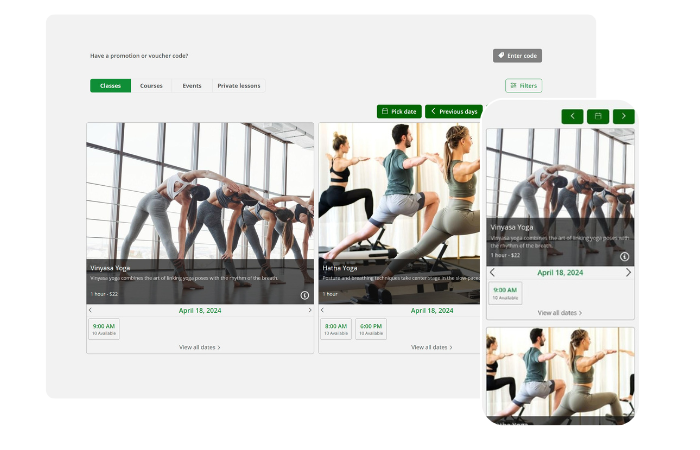
Flexible payment settings allow full prepayment, partial deposits, or pay-later options. Bookeo charges no additional commission on payments beyond standard gateway fees.
Conclusion
You now have a clear framework for selecting yoga booking software that serves your studio’s needs. Start by defining your business model and essential features. Compare pricing structures and factor in transaction fees beyond base subscriptions. Test platforms through demos and trials before you commit.
The right software should simplify operations, not complicate them. Your students deserve continuous booking experiences. Your team needs user-friendly tools that save hours on administrative work. Focus on platforms offering reliable support, straightforward pricing and features matching your requirements.
Take your time evaluating options. Run real classes during trial periods. This decision affects your studio’s efficiency and revenue.