

How to Choose Tour Booking Software for Tour Providers That Actually Boosts Your Bookings
If potential guests cannot book your tour instantly from their phone, they will move on to a competitor who offers that convenience. 60-70% of tour bookings happen on phones. The stakes are high.
Yet knowing how to choose tour booking software feels overwhelming. Pricing models vary wildly. Features differ from one platform to another. Tour providers rarely struggle because they cannot sell experiences; they struggle because operations break down under volume.
We’ll walk you through choosing tour booking software that streamlines operations and boosts bookings.
Why Tour Booking Software Matters for Your Business
Tour providers often underestimate how choosing tour booking software transforms their entire business model. The change from phone-based reservations to digital systems affects every aspect of operations, from customer acquisition to revenue generation.
Meet Modern Customer Expectations
Travel booking behavior has changed fundamentally. Nearly 65% of all global travel bookings will happen online by 2026. Before COVID-19, 82% of all travel bookings took place online through mobile apps or websites. These numbers reveal a clear pattern. Travelers expect digital convenience.

Generational priorities drive this change. Research shows 86% of Millennials (now aged 30-45) and 76% of Gen Xers want to book their experiences online. They just need immediate booking options, simple payment choices, and quick responses. Travel companies that fail to offer direct booking options through integrated technology see their satisfaction scores drop by 3% or more. Your business appears outdated and difficult to reach without the right tools.
Automate Operations and Save Time
Manual booking processes drain resources faster than most providers realize. Studies show automation can save travel companies between 40-70% in operating costs. This dramatic reduction comes from eliminating repetitive tasks that consume hours every day.
A booking system maintains one calendar that combines bookings across all channels, including your website, OTAs, partner sites, and affiliates. You no longer check multiple calendars and manually unite everything. Your calendar updates instantly when someone books a tour and sends availability back to all connected channels in real time. This automatic synchronization eliminates the back-and-forth emails and reduces manual entry errors. Staff can focus on guest experiences rather than administrative work.
Customer service automation handles the majority of questions without human intervention in a similar way. One major booking platform reported that approximately 60-70% of queries in the last year were resolved automatically. This capability minimizes waiting times while freeing resources for more complex tasks.
Get Informed Insights
Booking systems provide detailed analytics dashboards that show exactly what drives your business. You can measure bookings and revenue to understand which sales channels or partner sites send you the most bookings, which tours are your best sellers, when you hit capacity versus when you’re slow, and what types of customers book with you, along with their priorities.

This data helps you build more effective marketing and retargeting campaigns. You know which types of customers you convert, whether families, solo travelers, or couples, so you can create targeted ads that speak directly to them. Modern reporting tools allow providers to see seasonal demand patterns and utilization rates, upsell and add-on performance opportunities, high-demand time blocks and booking windows, plus operational bottlenecks affecting efficiency. Informed providers make decisions around staffing, inventory, pricing, and marketing instead of relying on guesswork.
Reduce Booking Errors and Overbooking
Preventing overbookings preserves your reputation and protects your bottom line. You face an impossible position when you accidentally overbook. You must reschedule customers, cancel on them entirely, or scramble to accommodate more people than you can handle realistically. Any of these options risks seriously annoying customers, earning negative reviews, and losing their business altogether.
Updates in real time solve this problem. Many booking systems offer resource management to keep an inventory of tour supplies, equipment, and staff members. Resource and availability management work together to block bookings automatically when you don’t have the time or resources to support them. This saves you from tracking inventory and availability across multiple sites manually every time a booking comes in. It eliminates the risk of double-bookings or accepting reservations you can’t fulfill. One ferry provider reported that customer complaints decreased dramatically after implementing updates in real time.
Increase Revenue Through 24/7 Availability
Your tour business never closes with an online booking system. Customers can browse your offerings, check availability, and complete their bookings at any hour, whether it’s 2 a.m. on a Tuesday or during a holiday weekend when your office is closed. Your system handles the entire process automatically. Customers select their preferred tour time, complete checkout, and receive instant confirmation, all without you lifting a finger.
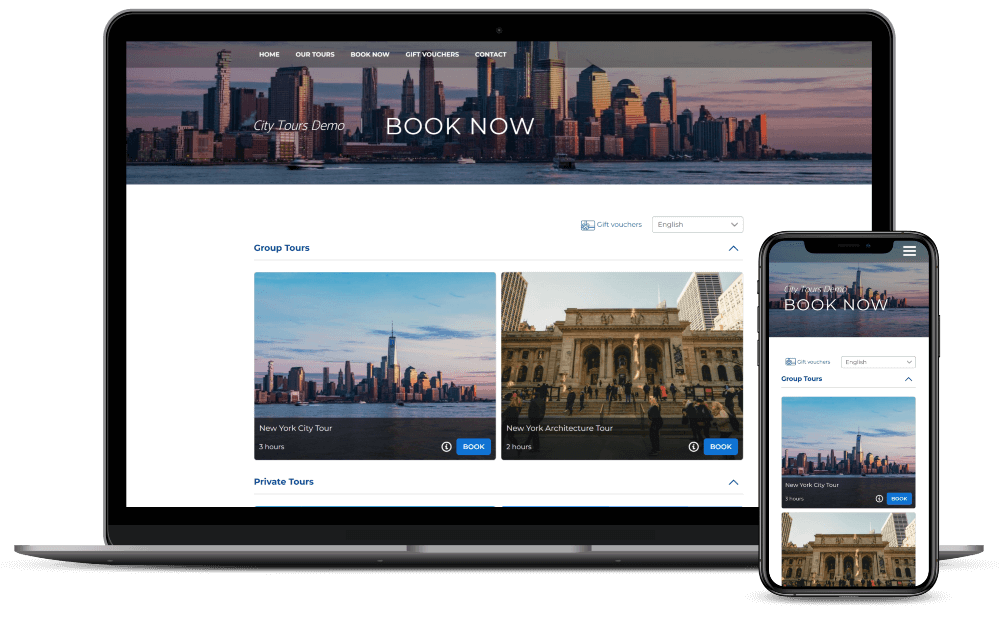
This 24/7 availability proves valuable, especially for attracting international travelers booking from different time zones or making last-minute plans outside of business hours. You capture bookings you would otherwise miss. Customers appreciate the convenience of booking on their own schedule. One provider summarized it perfectly: “With an online booking system, your clients can customize and book their tours on their own schedule, without needing help from you or your staff”.
What Makes Tour Booking Software Different from General Booking Systems
Tour operations require fundamentally different booking logic than rental operations or appointment scheduling. Choosing tour booking software means understanding these operational distinctions. Pick software designed for the wrong model, and you will fight it every day.
Time-Slot Departures and Fixed Schedules
Tours depart at fixed times: 9am, 1pm, and sunset. Your software needs to offer specific departure slots. This structure offers customers a smooth and organized travel experience.
Tour software manages time-slot departures with group capacity limits. This is different from rental or appointment systems that allow customers to choose any available time window. A bike rental operates on date-based reservations where someone can pick up equipment anytime during business hours. A kayak tour that departs at 9am with a 12-person capacity requires entirely different logic. General booking software forces you to manage capacity manually, which leads to overbooking.
Travel agencies typically secure a fixed number of rooms or spots for these trips and then promote the package to potential travelers. So the booking system must track these pre-set parameters automatically.
Group Capacity Management
Each departure has a maximum of 8 people on a kayak tour, 12 on a walking tour, and 6 in a UTV. The software must close the slot when it’s full. It should show the remaining spots to incoming customers. Live tracking maintains accurate and current information about balance capacity for both rooms and seats, streamlining operations and avoiding any overbooking.
The system updates core information in real-time as bookings are made. This automatic capacity blocking prevents the frustration of accepting reservations you cannot fulfill. Providers have to manage multiple vendor reservations, such as hotel booking, transportation, and activities, when dealing with fixed departures. A centralized system simplifies this process by consolidating all vendor reservations under a single record.
Per-Person Pricing Logic
Tours charge per person, not per unit. A family of 4 booking a $65.00/person tour is a $260.00 transaction. The software calculates this, not the customer. This pricing structure is different from equipment rentals or venue bookings that charge a flat rate, regardless of the participant count.

Tour pricing rarely stays flat. Pricing changes by season, day, group size, pickup zones, and add-ons. Defining fixed departures as products within your system proves significant. By adding specific tours as products, you can easily incorporate them into customized quotes for prospective clients. The same product generates invoices for the travelers once the tour is confirmed.
Guide and Resource Assignment
The software should track which guide is assigned to which departure if you have multiple guides running concurrent tours. Fixed departure tours are accompanied by a dedicated guide throughout the entire trip. Managing equipment, vehicles, and venue access requires proper resource configuration.
Resource management prevents scheduling conflicts. The system allows bookings only when a tour guide becomes available. This prevents double-booking your staff or equipment across overlapping time slots.
Minimum Participant Requirements
Some tours only run with 4+ participants. Software should auto-cancel or notify you when a departure falls below a minimum of 48 hours out. Many providers require a minimum number of travelers to book an adventure for their departure date to go ahead or become a guaranteed departure date.
Essential Features to Look for When Choosing Tour Booking Software
Selecting the right features separates functional tour booking software from transformative systems. The following capabilities affect your conversion rates and operational efficiency.
Immediate Availability and Capacity Control
Immediate availability eliminates the chaos of manual inventory tracking. Over half of tour companies still lack online booking systems, which creates frequent errors and double bookings. Live availability tools update remaining spots automatically whenever someone books or cancels. These updates appear instantly across your website, OTAs, and distribution platforms.

Centralized tour management creates one source of truth for booking data. Your team receives automatic manifest updates and notifications about changes. Automation handles updates and processes bookings while managing cancelations without jumping between systems. Capacity management prevents accepting reservations when resources become unavailable. The system blocks bookings when you lack time or resources to support them.
Integrated Payment Processing
Payment flexibility drives conversions. Research shows 65% of revenue in the global travel and tourism market comes from online sales channels. So your software needs diverse payment options beyond card processing.
Your booking system should support deposits, full payment, or the collection of credit card details for later payment. Payment state must tie to booking state so staff avoid chasing money manually.
Multiple payment gateways create redundancy. Another takes over when one gateway experiences technical issues or routine maintenance. This backup system maintains a continuous revenue flow.
Digital Waiver Collection
Digital waivers streamline compliance while eliminating paperwork. Automated waiver collection happens before guests arrive. Systems prompt customers to sign during booking, with automated email reminders sent leading up to their activity. Staff can track completion status by checking the manifest.
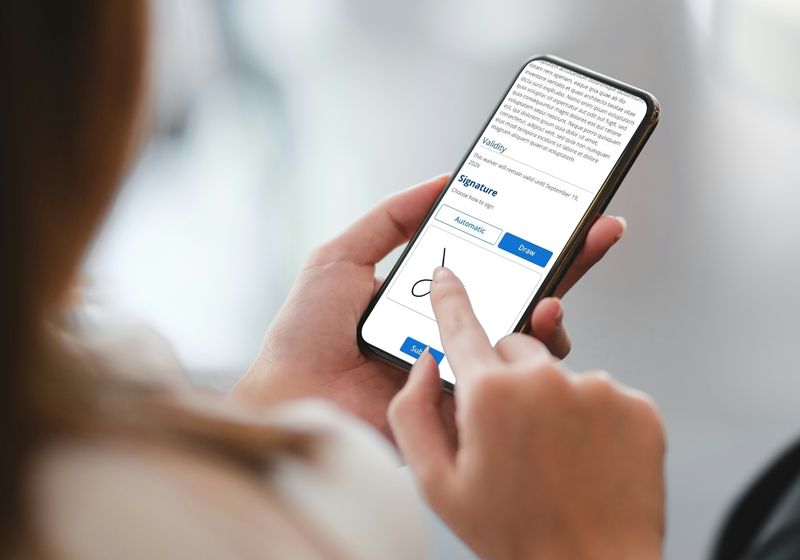
This approach speeds up check-ins. Visitors sign waivers online, which reduces wait times and improves their experience. No printing, no delays. Guests complete waivers on their phones before arrival. This reduces check-in delays and keeps lines moving during peak seasons. Digital waivers centralize participant information and make records easier for staff to access during high-volume days.
Automated Confirmations and Reminders
Automated communication systems decrease cancelations by up to 22.95%. Well-implemented reminder systems can slash no-shows by up to 80%. Customers need confirmation after booking. Your software should deliver confirmation codes and essential details within seconds.
Effective confirmations include customer details, participant count, tour date and time, meeting location, payment information, confirmation number, cancelation policy, and contact information. Reminders sent 24 hours before departure allow enough time to resell seats to waitlisted guests. These reminders should include meeting-point directions with photos and packing checklists.
Mobile-Responsive Booking Experience
Mobile optimization has changed from optional to mandatory. Studies show that over 70% of travelers use mobile devices to plan trips. Nearly 50% complete bookings from their phones. 31% of leisure travelers and 53% of business travelers book using smartphones.
Responsive design must fit any screen size. Travelers book while commuting, standing in line, or exploring destinations. Google’s mobile-first indexing rewards mobile-friendly sites with better search rankings. Page loading speeds should stay under 5 seconds.
Multi-Tour Management Capabilities
Managing multiple tour types from one dashboard simplifies operations. Centralized platforms allow you to handle tour availability, pricing, and reservations across multiple channels. You can create multiple waiver templates tailored to different activities. Assign specific waivers for hiking activities and different templates for water sports.
Understanding Pricing Models and What They Mean for Your Budget
Pricing structures determine your long-term software costs more than any single feature. Three dominant models shape how tour providers pay for booking systems, each with distinct financial implications.
Per-Booking Percentage Model
Smaller tour providers who prefer variable costs that line up with revenue benefit from this model. You only pay when bookings happen. Your software costs drop proportionally during slow seasons. Junglebee charges 4% when you process credit card payments through their system, with 0% fees for cash, your own POS machine, or direct entries.
Payment processing adds separate costs besides the booking fee. Credit card merchant fees run 2-3% of each transaction. Some platforms bundle payment processing into their booking fee, and others separate these charges. This difference matters. A platform advertising 6% total fees that has payment processing is very different from one charging 6% booking fees plus separate merchant fees.
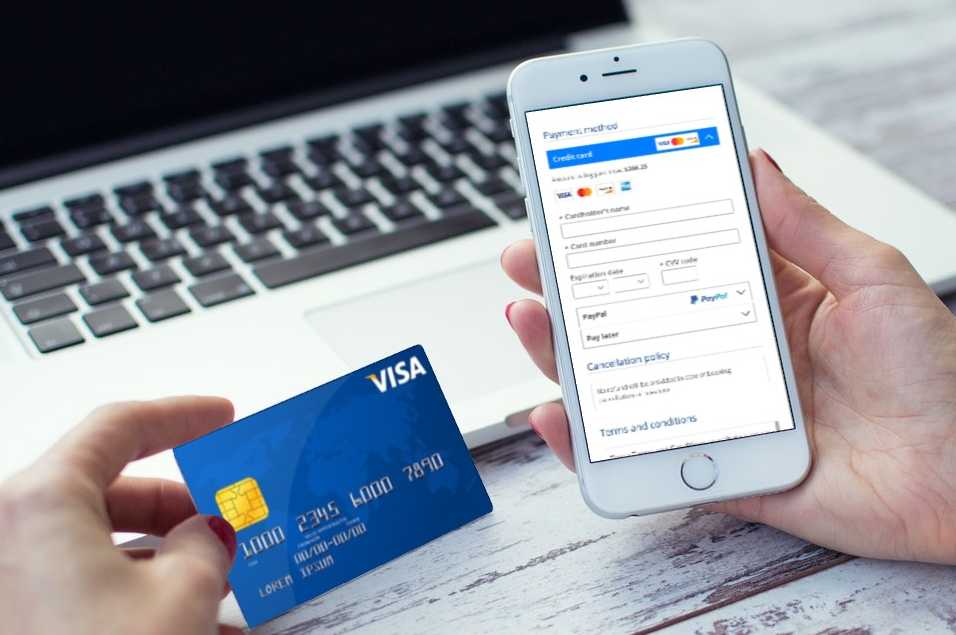
Platforms also vary in who acts as the merchant of record. Some booking systems process payments and handle refunds, which proved challenging during the 2020 travel shutdown. Others let you maintain your own merchant account and payment gateway. This gives you control over payment options and reduces dependency on the platform.
Several platforms charge different rates by booking channel. One system charges one fee for website bookings and another for front desk or OTA bookings. BookingTerminal charges 5% for online bookings but 0% for direct bookings created in the dashboard.
Monthly Subscription Model
Fixed monthly fees create budget certainty, whatever your booking volume. You pay the same amount during peak season and slow months. Subscriptions often prove more economical than per-booking fees for providers processing consistent bookings. Tour providers processing over $3.00 million annually negotiate custom enterprise pricing.
Customer-Pays Fee Model
Several platforms let you pass booking fees to customers instead of absorbing them. This approach maintains your advertised tour prices while recovering technology costs. Customer reactions vary by region. European markets expect prices that include all fees, while North American customers accept checkout fees.
Passing fees creates risk. Customers comparing your $100 tour plus $6 booking fee against a competitor’s flat $100 price may choose the competitor. This could cost you the 20%+ OTA commission if they book elsewhere.
Which Pricing Model Works Best for Your Operation
Startup and seasonal providers benefit from per-booking models that eliminate fixed costs during quiet periods. Year-round providers with steady volume often save money with subscriptions. Calculate your monthly booking value and multiply by commission rates. Compare this against subscription costs. If monthly bookings exceed $2,000 and commission rates hit 5%, you’re paying $100 monthly in fees, similar to many subscription plans that have lower per-booking rates.

How to Evaluate Tour Booking Software Options
Live demos and feature checklists provide surface-level understanding. Workflow testing with your actual operations is the most effective method to choose your tour booking software.
Test the Complete Booking Flow
Test the entire booking flow from the first search through final confirmation. Watch how the system handles back-to-back bookings. Observe the availability update speed. Speed matters because customers abandon slow checkout processes.
Set up pricing rules matching your scenarios during testing. If you charge different rates for adults versus children, implement that structure. If you offer early-bird discounts or weekend premiums, configure those rules. Systems that struggle with simple pricing logic will create daily headaches.
Test add-ons and upsells during checkout. Can customers select equipment rentals, photo packages, or pick up locations with ease? The booking widget should display these options clearly without cluttering the interface.
Check Cancelation and Refund Workflows
Cancelation handling reveals operational maturity. Check deposit logic and payment state handling. The system should automatically calculate refund amounts based on cancelation date and your policy.
Advanced platforms integrate with payment gateways to process refunds easily. This automation reduces manual input and minimizes errors while accelerating customer service response times. Partial refund capability proves significant for group tours when individual members cancel rather than entire groups.
Verify how the system manages cancelation communication. Automated emails should confirm cancelations while potentially offering rebooking options. Freed capacity must update instantly across all sales channels.
Verify Automatic Capacity Blocking
Try to book multiple tours at once to test capacity management. The system should block time slots automatically when you lack resources to support additional bookings. This prevents accepting reservations you cannot fulfill.
Ground testing matters most. Put the booking system through scenarios based on actual customer interactions. Direct yourself through the dashboard, process check-ins, and run reports. How accessible does the interface feel? Compare these experiences against your existing tools afterward.
Review the Admin Dashboard
Admin interfaces vary dramatically between platforms. Examine how the dashboard displays bookings, customer information, and payment data. Can you add, delete, or reschedule bookings with a few clicks?
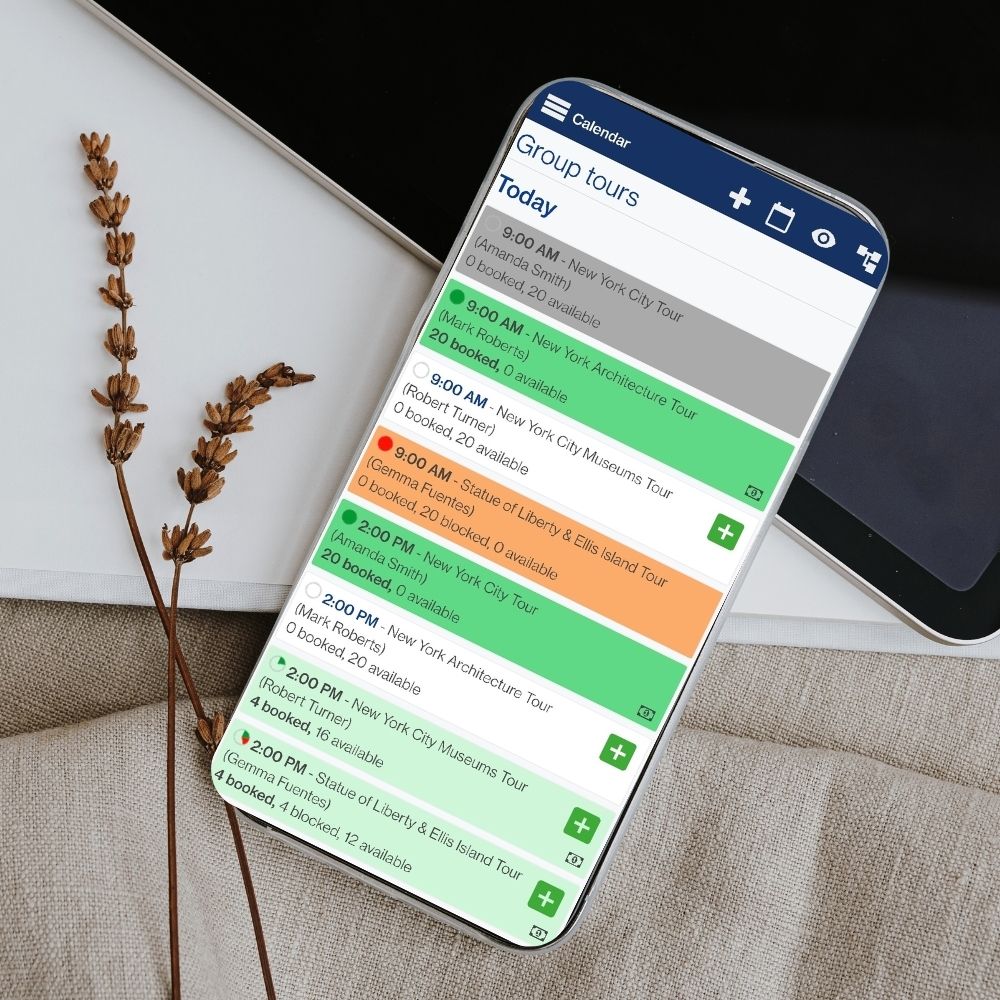
Review reporting capabilities for revenue, channels, and operations. The dashboard should generate insights on sales patterns and booking sources. Staff permissions and role management become significant as your team grows.
Assess Integration Capabilities
Integration capabilities determine how well the software fits your existing technology stack. Check compatibility with your website platform, payment processors, and digital waiver solutions.
API support matters if you work with partners or plan multi-location expansion. Bookeo integrates smoothly with websites without requiring technical expertise and allows you to embed booking widgets directly on your pages.
Red Flags to Avoid When Selecting a Platform
Warning signs during vendor selection reveal more about software quality than polished marketing materials. You can prevent costly mistakes when choosing tour booking software by recognizing these red flags.
No Free Trial or Live Demo Available
Vendors hide something when they do not offer a trial or live demo. This transparency allows you to test the complete customer experience from browsing tours to receiving confirmations.
Testing reveals operational realities that sales presentations gloss over. You find out whether the interface handles your pricing structure and whether the checkout process feels user-friendly. You also see whether the system manages capacity correctly. Platforms confident in their product welcome scrutiny.
Long-Term Contracts with Exit Penalties
Month-to-month terms represent the industry standard. Annual contracts with early termination fees lock you into software that might not work for your operation. Some vendors structure termination clauses that charge customers almost the full payment of the whole contract, regardless of the cancelation timing.
Early termination fees equal a percentage of remaining contract fees. Some vendors demand 50% of unpaid amounts. These penalties eliminate your ability to switch platforms when software underperforms. Software contracts should provide flexibility, not financial traps. Long-term commitments with exit penalties shift risk onto your business entirely.
Poor Mobile Booking Experience
Almost two out of five mobile shoppers have abandoned travel bookings due to poor user experience. UK travel companies lost £2.7 billion in a single year because of this abandonment. Navigation and payment process issues drove 26% and 27% of abandonments. Slow loading plagued one-third of users.

Mobile sales will account for 43% of all travel sales by 2028. Booking systems that lack mobile-friendly interfaces push customers toward competitors. Test the mobile checkout during demos really well. You will lose conversions daily if buttons feel too small, forms require excessive scrolling, or payment fields malfunction on phones.
Manual Capacity Management Requirements
You will overbook during busy periods if you manually close time slots when they fill. Automatic capacity control is non-negotiable. Manual systems just need constant monitoring across all sales channels. One missed update creates double bookings, angry customers, and damaged reputation.
Free tools often require manual capacity tracking because they lack real-time synchronization. You copy booking details between systems and update availability across platforms manually without automation. Selling through multiple OTAs without synchronized capacity creates overbooking disasters that are equally problematic.
Questions to During Demos
Demos reveal software capabilities. Drill into specifics that match your operational reality.
Can It Handle Your Specific Tour Types
See how the system manages your exact tour portfolio. Can the system handle virtual tours or self-guided experiences? Verify the platform accommodates specialty tours with unusual requirements before committing. Watch how add-ons and upsells appear at checkout. The system should display equipment rentals and photo packages or meal upgrades without cluttering the interface.
What Support Options Are Available
Support quality separates frustrating software from reliable partnerships. Ask when the support team is available, not just whether support exists. Some vendors offer 9am to 6pm coverage with emergency support extending to 2am. Others provide 24/7 assistance year-round.
Verify whether support costs extra or is included.
What Reports and Analytics Are Included
Analytics drive operational decisions, not just pretty charts. Verify if reporting matches your actual needs. Can you track revenue by channel? Do reports reveal which tours sell best and when you hit capacity? Analytics should identify booking sources, customer behavior patterns, and seasonal trends.
Making Your Final Decision and Getting Started
You need to match software capabilities against your operational requirements to narrow your choices. This decision shapes your booking efficiency for years ahead.

Create a Shortlist Based on Your Needs
Identify which operational issues you need to fix. Define what booking scenarios your software must handle and how it integrates with current business tools.
Run Real-Life Tests with Your Actual Tours
Build your actual tour product with real departure times, capacity, pricing, and description. Book it as a customer on your phone. Fill a time slot to capacity and attempt booking one more person to verify automatic blocking. Process a cancelation and refund while counting required clicks.
Think About Bookeo for Simplified Tour Operations
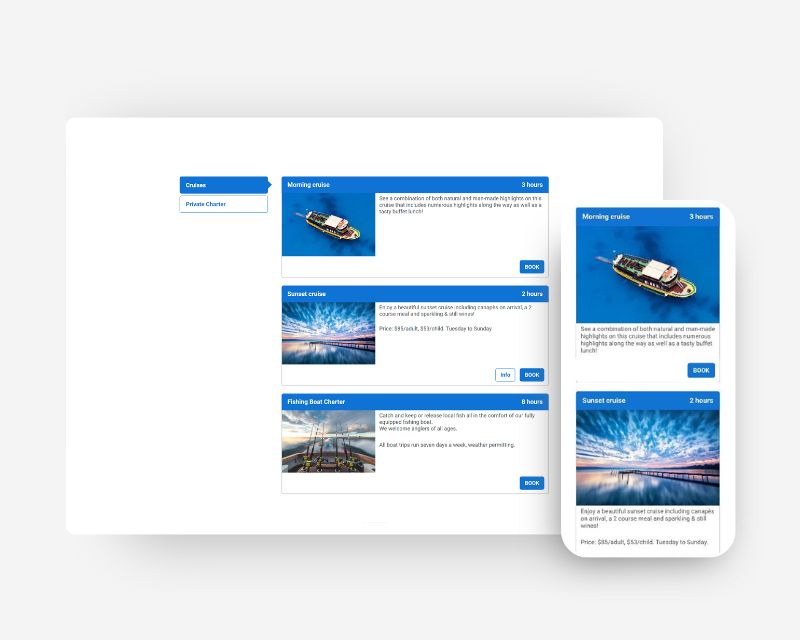
Bookeo delivers tour-specific functionality without complexity. The cloud-based platform requires no downloads and adjusts to any device screen size. Customers book through your website widget without popup windows. You can freeze your account during off-season with 70% fee reduction.
Plan Your Implementation and Staff Training
Remove duplicate records and standardize descriptions before migration. Set up seasonal availability patterns upfront rather than adjusting them manually. Staff training requires dedicated preparation time and immediate practice after sessions.
Conclusion
You now have everything needed to select tour booking software that streamlines your operations. The choice comes down to understanding your specific tour requirements and selecting features that eliminate manual work while testing systems with real booking scenarios.
Pricing models shouldn’t confuse you. Calculate your booking volume and compare commission costs against subscriptions. Choose what fits your budget. Prioritize immediate capacity management and mobile optimization since these affect your conversion rates.
Test platforms with your actual tours. Run through complete booking flows and process cancelations. Verify that automatic capacity blocking works without issues. Your software choice determines operational efficiency for years ahead, so invest effort upfront to get it right.