

How to Choose Salon Scheduling Software: The Ultimate Guide for Beauty Professionals
Clients now expect more than great service. They want convenience and the ability to book appointments with a few taps on their phones. Your salon is one step behind if it isn’t offering a smooth way to schedule services. Choosing the right scheduling software for salons can reshape your operations. Salon scheduling systems don’t just replace pen-and-paper planning. They deliver a smoother, more professional experience for both clients and staff. This piece walks you through choosing salon scheduling software that fits your salon’s needs.
Why Beauty Salons Need Dedicated Scheduling Software
The move to online booking expectations
Your salon’s reputation doesn’t just depend on how well you cut hair or apply color. Clients judge you the moment they try to book an appointment. They move on to someone who can deliver that experience if they can’t secure a slot within seconds.

The data paints a clear picture. Nearly half of salon clients say they’d be much more likely to return to a business that lets them book or modify appointments any time, day or night. Another 42% of online bookings happen when your salon is closed. Almost half your potential bookings could be slipping through your fingers while you sleep. Think about that.
The frustration runs deeper. A staggering 71% of regular salon clients admit they’ve walked away because reaching someone or booking online proved too difficult. You’re not just losing appointments when customers find limited booking hours frustrating. You’re bleeding revenue to competitors who solved this problem months ago.
Modern clients don’t tolerate phone tag anymore. They want instant confirmation, real-time availability, and the freedom to manage their own schedules. Salon scheduling systems deliver exactly that and transform your business into a 24/7 operation without anyone working overnight shifts.
Time savings and operational efficiency
Running a salon means juggling dozens of moving parts at once. Staff schedules change, clients reschedule at the last minute, and someone still needs to answer the phone between services. Traditional methods drain hours from your week.
Automation changes this equation. Salons using scheduling software for salons report reducing administrative workload by up to 70%. That’s not a minor improvement. That’s reclaiming entire days of staff time previously lost to manual booking, confirmation calls, and schedule coordination.
Real-time availability prevents the chaos of double bookings and empty slots. The system updates the moment a client cancels. Another client can grab that spot without your team lifting a finger. So you fill more chairs with less effort.

The efficiency gains compound quickly. Automated confirmations replace phone calls. Online rescheduling eliminates back-and-forth texts. Payment processing happens naturally at checkout. More, your team spends less time on administrative tasks and more time delivering the services that generate revenue.
Take this example: automated reminders handle confirmation calls instead of staff members manually calling clients to confirm tomorrow’s appointments. Your stylists can focus on the client sitting in their chair rather than worrying about who’s showing up next.
Reducing no-shows and cancelations
Empty chairs cost money. Industry data reveals that no-shows drain 5-10% of a salon’s annual profit. The financial hit becomes impossible to ignore when you factor in average no-show rates hovering between 15-30%.
The problem extends beyond lost revenue from that single appointment. The stylist sits idle when a client doesn’t show for a multi-hour color treatment. You can’t fill that gap on short notice. The lost opportunity has not just the service fee but potential product sales and future rebookings.
Automated reminder systems move these numbers. Research shows text message reminders improve appointment attendance rates by 14%. An additional reminder can reduce no-shows by 7-11% for high-risk appointments. Salons implementing automated scheduling experience 25% fewer no-shows compared to manual reminder processes.
The mechanics are straightforward. Clients receive confirmation right after booking. A reminder arrives 24-48 hours before the appointment. Another notification comes the morning of their service. Each touchpoint keeps the appointment top of mind without burdening your staff.
In fact, deposit systems provide another layer of protection. Over 60% of salons using booking software request deposits at the time of booking. This financial commitment reduces cancelations and improves cash flow. Clients show up or cancel with enough notice for you to fill the slot from your waitlist when they have money on the line.
Building a professional brand image
Your booking process creates a first impression before clients ever step through your door. A clunky system signals disorganization. Unanswered calls suggest you’re too busy to care. Competitors offering smooth, instant booking communicate professionalism from the first interaction.
Convenience has become part of your brand identity as client expectations change. Clients don’t just buy haircuts. They buy the entire experience surrounding that service. You reinforce trust at every touchpoint when your salon scheduling software matches the quality of your work.
Three-quarters of salon regulars say they’d be more loyal to a salon offering easier booking and communication. That loyalty translates to recurring revenue. Clients stick around when you make their lives simpler.
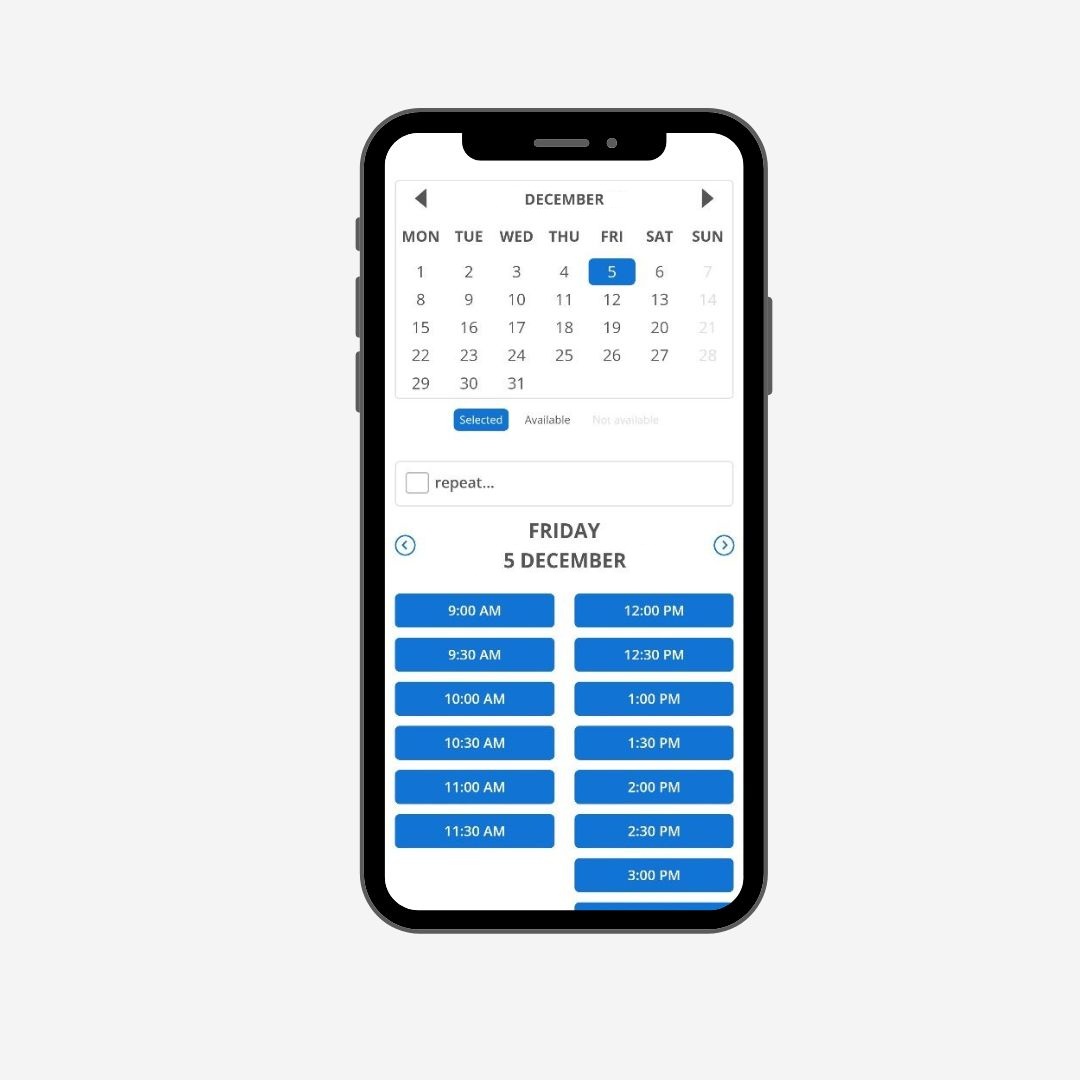
The professional edge extends to how you handle the inevitable changes. Clients appreciate the flexibility when they can reschedule themselves through a mobile-friendly interface. They feel confident you have everything under control when automated confirmations arrive promptly. These small details accumulate into a reputation for reliability that keeps clients coming back and referring friends.
Essential Features to Look For in Salon Scheduling Systems
Finding the right scheduling software for salons means knowing what matters. Features sound impressive on paper, but only specific capabilities move your business forward. This section breaks down what separates functional systems from those that work.
Online booking and client self-service
Smart scheduling tools create smooth online client experiences that operate around the clock. Your booking system should sync whether appointments happen in person or through your website.
Clients need to schedule appointments 24/7, select services, choose their preferred staff member, and pick time slots that fit their schedule. Beauty services should match the appropriate staff and rooms without manual input. Self-service portals let clients manage their own appointments without calling your salon.
The calendar must update immediately. One client books, and that slot disappears for everyone else. Cancelations should open availability right away. This prevents double bookings and eliminates awkward phone calls explaining that the slot someone wanted is already taken.
Automated appointment reminders
Appointment confirmations and reminders reduce no-shows and give clients the option to reschedule before their slot goes to waste. You can send customizable alerts via email or text before and after salon appointments.

Reminder systems work in layers. First comes booking confirmation. A reminder arrives 24 hours before the appointment. A check-in message goes out on the day of service.
Customization matters here. Set your preferred timing for reminders. Include service details, pricing, and cancelation policies in your messages.
Client management and history tracking
Native CRM tools help you keep tabs on clients and build stronger relationships. Salon software shows past client visits and purchase history, with space for stylists to enter notes.
Store appointment history and preferred services to tailor each client’s experience. Profiles should include birthdays, alerts, appointment history, notes about preferences like hair extension or makeup choices, color code history, and payment history.
Track no-shows, cancelations, and tardiness patterns. This data influences service prioritization and helps identify your most reliable clients. View product purchase history and individual bookings to create reward opportunities that encourage loyalty.
Include space for intake forms linked to specific services. Collect answers to key questions. Everything gets saved in the client’s profile for future reference.
Staff scheduling and calendar management
Color-coded calendars keep stylists fully booked and on top of appointments. Owners and stylists can view working hours, availability, and sales from any device.
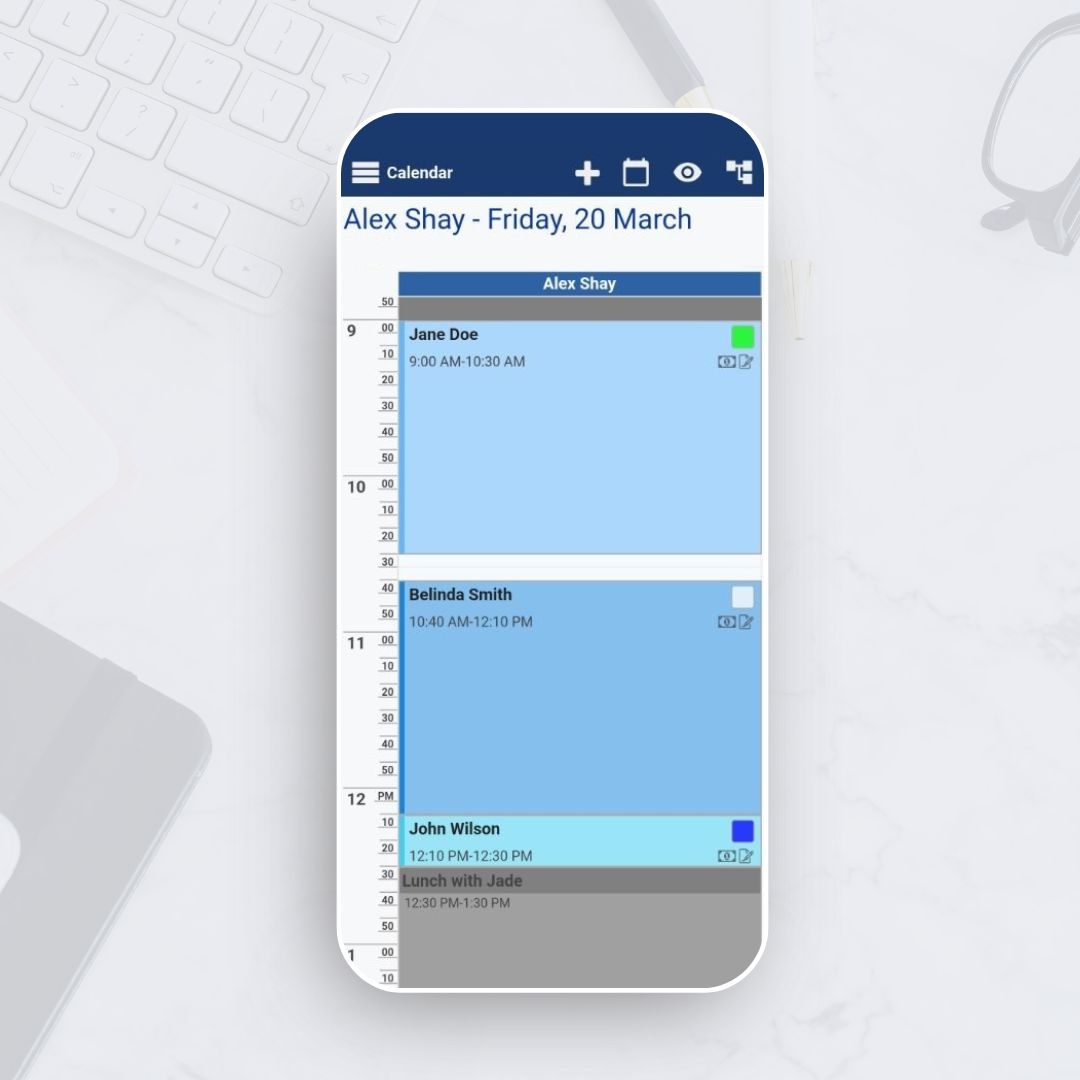
Set staff availability and shift schedules with clarity. Assign services by team member based on their skills and certifications. Double bookings should be prevented while appointments get distributed based on who’s available.
Drag-and-drop functionality makes rescheduling effortless. Add appointments or set up recurring bookings based on customer priorities and resource availability.
Payment processing
Accept any payment type in person or require deposits for online appointments. Salon payment tools should calculate taxes, discounts, and gratuities without manual input. Some services let you keep cards on file and offer no-show protection.
Process payments directly from your salon software. Check out multiple appointments, or include additional services with simple drag-and-drop functionality.
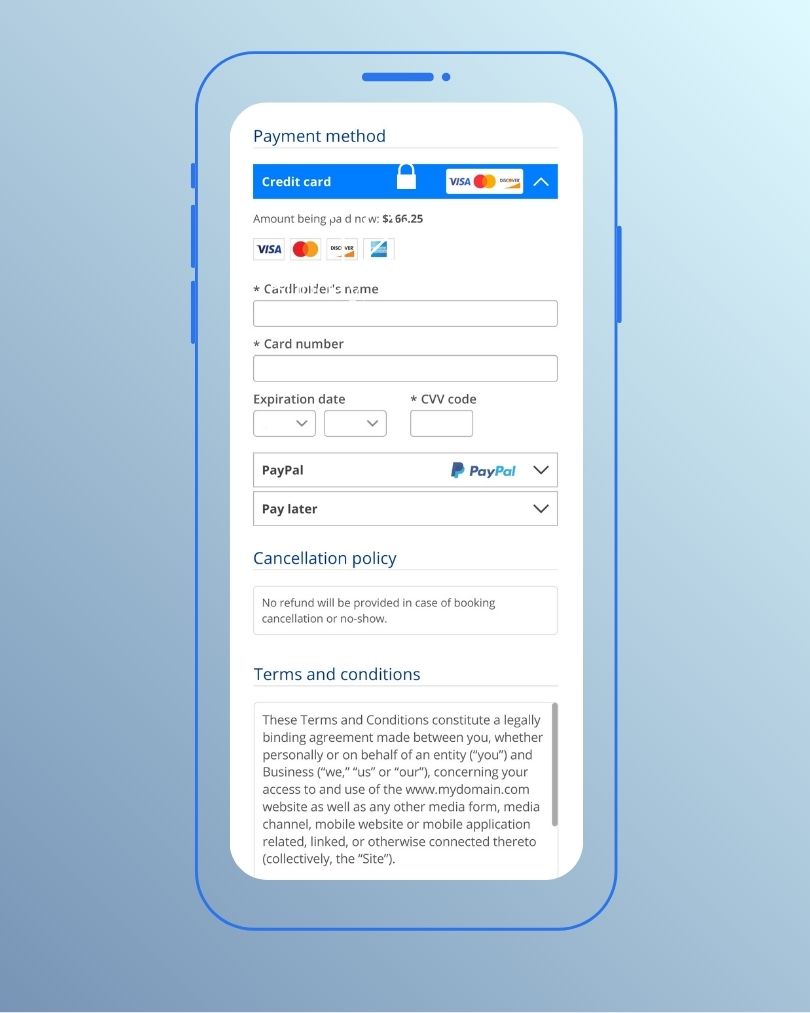
Secure bookings and protect against no-shows by accepting upfront payments during online scheduling. Send email receipts with convenient pay buttons and allow clients to settle at their convenience.
Marketing and communication tools
Several salon scheduling systems have native text, social media, and email marketing tools. These may include templates and automated services.
Promote special offers, announce changes to hours, or share updates directly from the online booking screen. Track client packages, discounts, and special rates with ease. Email campaigns and automated follow-ups turn one-time visitors into loyal clients. Promo codes, discounts, and referral bonuses keep them coming back.
Understanding Different Types of Scheduling Software for Salons
Salon scheduling systems fall into distinct categories. Each has different operational models and cost structures. These differences help you identify which approach lines up with your business model and growth trajectory.
Standalone booking platforms
These platforms specialize in appointment scheduling alone. Their sole focus is handling bookings, calendar management, and client communication. You get a simplified system built for managing who books what service and when.
Standalone platforms work well when you already have separate systems for payments or client records. They integrate with your existing tools rather than replacing them. Salons wanting scheduling functionality without overhauling their entire operational infrastructure will find this approach makes sense.
The trade-off comes in fragmentation. Your team juggles multiple logins. Data doesn’t flow between systems on its own. A client books an appointment on one platform, but you process payment through another. Reporting becomes manual when information lives in different places.
All-in-one salon management systems
These detailed platforms combine scheduling with payment processing, inventory management, client databases, marketing tools, and reporting analytics. Everything operates from a single dashboard. Your staff logs in once and accesses every operational function.
All-in-one systems eliminate data silos. When a client books, their appointment appears in the calendar and their profile updates on its own. Payment processing connects naturally. Staff scheduling and marketing campaigns all live in the same ecosystem.
The integration pays dividends in efficiency. Your team stops toggling between platforms. You gain unified reporting for every business function. Operations become centralized, so training new staff becomes simpler. One system to learn instead of five.
Commission-based vs subscription models
Commission-based platforms function like marketplace directories where consumers find and book services. The platform takes a percentage of each transaction in exchange for visibility and booking infrastructure.
The better your business performs, the more you pay. Every extra booking increases your software cost on its own and indefinitely.
Subscription-based platforms charge a predictable flat fee monthly or annually. Booking volume or revenue generated doesn’t matter. Your cost stays the same whether you have a quiet Tuesday or your busiest Saturday ever. This model lines up platform incentives with yours.

Zero-commission platforms include all core features in their subscription: scheduling, client management, POS, basic marketing, and reporting. The absence of per-transaction commissions keeps total costs far lower.
Data ownership matters just as much. On commission-based marketplace platforms, the platform controls search results, reviews, booking flow, and communication channels. Clients book through your own website using subscription software, and they know your brand, location, and phone number. This difference matters for long-term business value.
Cloud-based vs desktop solutions
Cloud-based software stores your entire business platform and data securely online. One computer or tablet fails, and you log in from another device. All tools and data remain available from any location with an internet connection.
Cloud systems update remotely and eliminate downtime for software updates. You access the same information whether checking schedules from home or reviewing sales data while traveling. Your team works from any current tablet or smartphone rather than requiring specific hardware.
Desktop systems tie you to physical locations and specific computers. A desktop crash could lose guest details, appointment books, and operational history. Manual updates require time and technical knowledge. You can’t check schedules or process bookings when away from that specific computer.
Cloud platforms enable immediate collaboration. Multiple staff members access current schedules at the same time. Changes appear across all devices right away. Multi-location salons get a unified view of operations at every site through cloud systems.
How to Evaluate Your Salon’s Specific Software Needs
Selecting the right system requires honest self-assessment. What works brilliantly for a solo stylist might suffocate a growing multi-location brand, while enterprise solutions overwhelm small teams with complexity they don’t need. Your evaluation starts with understanding where your business stands now and where it’s heading.
Assessing your business size and growth plans
Staff count drives many software decisions. Think over how many team members need access, broken down by service professionals, managers, and front-desk personnel. Some vendors cap stylists per tier. Others count all logins.
Solo practitioners benefit most from automation features that streamline administrative tasks like payment tracking and client intake forms. Booth rental models need booking links and multiple payment accounts. Medical spas and esthetic clinics require specialized features that support their unique service models.

Multi-location salons face different requirements altogether. Instant access to reports that collect data from all locations becomes critical. You need systems that provide both micro and macro-level views. These allow changes at individual locations that improve performance overall.
Growth plans matter just as much. Determine how much more you’ll pay when hiring employees, adding chair renters, or opening new locations. Some vendors force you into the next tier. Others add flat fees for additional users or sites. Salons planning expansion need systems that support additional locations, services, new team members, advanced analytics, and custom branding options.
Identifying must-have vs nice-to-have features
Pull up your business plan and get to the top objectives. Match platform features against your business model rather than choosing based on marketing promises.
Drill down into how each feature works on different platforms. Look at user reviews, support pages, and live demos. Rate each feature and see how platforms stack up. A tool must be user-friendly for its intended audience to work.
Test client-facing booking features, admin tools, and stylist settings during trial periods. Ask yourself which team members will use the software and how many need access. Training takes 2 to 4 hours for functions like scheduling and client lookups. Advanced features like reports and marketing tools may need extra training sessions.
Determining your budget range
Salon management platforms cost between $29 and $200 monthly, depending on features and business size. Create a shortlist and request price quotes from each vendor.

Many platforms use tiered pricing structures. Base plans may allow one to two users. Higher-tier packages increase this. Calculate total monthly costs by factoring in additional fees for automated SMS or email reminders, payouts to booth renters and marketing activities.
Include setup fees, training costs and payment processing rates in your budget. Most systems pay for themselves in 2 to 3 months through fewer no-shows and increased bookings. Break down strengths and weaknesses of each option while noting confusing contract terms or fees to discuss during demos.
Review agreements to understand contract termination procedures, notice periods and potential fees providers might charge.
Your technical comfort level matters
Training takes 2 to 4 hours for core functions. Pick systems designed for easy learning. Modern systems are built to be intuitive, even with minimal tech experience.
Most quality salon booking programs help transfer client information, appointment history and priorities from old systems. Check data export options before switching. Maintain backups during transitions.
Many modern systems work with tablets, phones or computers you own already. Cloud-based solutions need solid internet, that’s all.
Choosing Top Salon Scheduling Software Solutions
Narrowing down salon scheduling software requires looking at specific solutions matched to different business models. Each platform serves distinct operational needs and scales differently as your business grows.
Bookeo for complete booking features
Bookeo’s online booking software handles appointment scheduling for salons, spas, nail salons, and other service providers through its flexible platform. Clients can book appointments through your website via a simple HTML snippet that maintains visual consistency with your site design. It works with WordPress, Wix, Squarespace, Weebly, and Shopify. Bookeo’s salon scheduling software provides hosted booking pages customizable with your logo, brand colors, and unique web address if you don’t have a website.
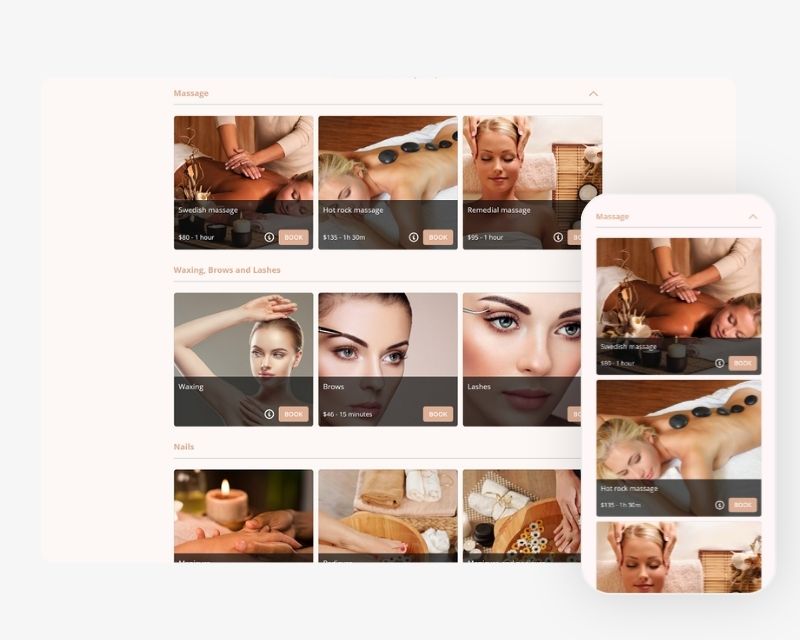
The platform supports one-on-one, semi-private, and virtual appointments with adjustable availability by staff, service, or location. Buffer times between sessions prevent schedule conflicts. Payment integration with Stripe, Square, and PayPal allows full charges or deposits at booking. You can have digital waivers signed online or in-store through the Kiosk app, with copies linked to customer profiles automatically.
Testing Software Before You Commit
Free trials exist to remove the risk barrier when selecting salon scheduling systems. Software companies want to show prospective customers the value they’ll receive if they decide to buy the product. But free trials come with inherent limitations that affect how well you can review a system.
Taking advantage of free trials
Ask vendors specific questions before starting any trial. Is there support available while testing the software? The trial period gives you an excellent chance to identify overly complex features and interact with customer support staff. Check how many logins you receive, which features are available, and how long the trial lasts.
Free trials restrict access to all offerings in most cases. You’ll encounter limited features and functionalities, usage limits that prevent adequate scaling, a lack of training and support resources, and greater security risks. To name just one example, if you need accurate data to measure the value of that salon scheduling software and you can’t collect such data within the trial period, then that trial proves worthless.
Learning curves present another thing to think about. Getting into the system takes time at first, but investing that effort allows you to maximize features for bookings, pricing, appointment duration, customer management, holidays, and schedules. Enterprise-level systems tend to intimidate users without training. This makes free trials ineffective in most cases.
What to test during trial periods
Start by booking appointments through the platform yourself. Is it fast and easy to use? Your clients will judge it the same way you do. Test the actual booking flow from a client’s view, then get into admin tools and stylist settings.
Review whether the system matches your complicated business processes. Given that some platforms prove too complex, a free trial might not work for you without proper guidance. You need deep consultation with the solution provider to succeed in choosing the right fit.
Getting team feedback
Your team will be working with the trial software daily. Their input matters because they’ll spot usability problems you might miss. Overhead costs exist for every company that provides trials, and they view you as an opportunity cost. Make that investment worthwhile by involving everyone who’ll use the system.

Reviewing customer support quality
Customer support quality reveals itself during trials. What is the typical timeline for data migration and onboarding? The vendor should estimate time frames based on their experience with salons of a similar size.
Implementation and Getting Your Team On Board
You’ve purchased your chosen platform. This marks the beginning of your scheduling transformation, not the end. Roll out your new system to maximize adoption and minimize disruption.
Setting up your booking system
Implementation spans 1-4 weeks, depending on your salon’s complexity and staff training needs. Simple setups go live within days. Detailed systems with extensive customization may require a month. Companies focusing on mid-market operations get you running in 7-14 days.
Phase your approach to build confidence and avoid operational chaos. Spend weeks one and two configuring simple settings, importing client data, and setting up services. Week three focuses on training the core team members who become internal champions. Launch online booking for new clients only during week four. Weeks five and six migrate existing clients and encourage online rebooking. Enable advanced features like automated marketing and reporting in weeks seven and eight.
Importing existing client data
Most reputable providers offer data migration services, though processes vary by system. Prepare client lists, appointment history, and service records in spreadsheet format for import. You can bulk upload customer and inventory lists to get up and running quickly.
Training staff members
Training requires 2 to 4 hours for functions like scheduling and client lookups. Advanced features like reports and marketing tools may need extra training sessions. Salons completing structured training programs achieved full staff adoption 3x faster than those using informal training approaches.
Launching to clients
Start with enthusiastic early adopters. Emphasize benefits like easier scheduling and reduced paperwork. Think about gradual rollouts rather than overnight switches to ease the transition. Announce your new system through email newsletters, highlighting ease and convenience, social media posts demonstrating how it works, and in-store signage prompting walk-in clients to try online booking.
Common Mistakes to Avoid When Choosing
Most salons rush their software decisions, then spend months regretting the choice. Where others stumble helps you sidestep expensive mistakes.
Choosing based on price alone
Low upfront costs mask the real expenses. Platforms advertising cheap monthly fees often rely on transaction charges, add-ons, or usage-based pricing that escalates as booking volume climbs. Free plans seem attractive at first, but transaction-based fees and commission on bookings raise costs without being obvious. How expenses scale as your business grows prevents unexpected increases later.
Ignoring scalability needs
Limited systems force disruptive switches just when business momentum builds. This transition costs time and money while risking data loss or confusing clients. Your software costs tripled when you added a second location or hired your fifth stylist? The pricing model doesn’t line up with your growth. Model costs at 1.5x and 2x current size before committing.
Overlooking integration requirements
Closed systems become bottlenecks as your business expands. Does your salon scheduling software integrate with existing tools like accounting software or CRM? Good integrations mean data flows between systems and save manual entry while reducing errors.
Skipping the trial period
The trial period gives you an excellent chance to identify overly complex features and interact with customer support staff.
Conclusion
Right now, you have everything needed to select salon scheduling software that fits your business. The choice between platforms matters less than understanding your actual needs, testing the options, and avoiding commission traps that eat into profits.
Therefore, start with an honest self-assessment. Identify your must-have features, determine your real budget, including hidden fees, and use those free trials. Your team’s daily experience depends on this decision.
Choose software that grows with your salon rather than forcing you into expensive migrations later, which is the most important factor. Take your time with this process. The right system will reduce no-shows and keep clients booking for years to come.