

Reserve with Google for Spas: Getting Spa Bookings from Google Search and Maps
A spa can offer an extensive treatment menu, a skilled team, and excellent reviews, yet still lose a potential client who discovers it on their phone at lunchtime and wants a massage at four o’clock. The problem may not be the spa itself, but the friction involved in making a booking. When clients have to navigate to the website, find the booking page, and enter their details on a small screen, some will abandon the process before confirming their appointment. Google is often the first place people turn when searching for a local business, and many now start their search directly in Google Maps. In BrightLocal’s April 2025 consumer survey, which surveyed 1,000 US adults, 15% of consumers said they would use Google Maps as their first port of call when looking for a local business. For spas, this means potential clients may be discovering treatments and comparing nearby providers right inside Google Maps, without ever visiting a traditional search results page.
Reserve with Google for spas helps bridge the gap between discovery and booking. It adds a booking button to a spa’s listing in Google Search and Google Maps, allowing potential clients to book a treatment without leaving Google. This article explains how Reserve with Google works, how bookings flow into the spa’s appointment calendar, and what a spa needs in place before the booking button can appear. It also covers which treatments to list, how deposits and fees work, why the feature can be particularly valuable for spas that rely on walk-in clients, how to activate it, and how to measure its impact.
What Reserve with Google Is, and What the Book Button Does for a Spa
Reserve with Google is a feature that adds a booking button to a business’s listing in Google Search and Google Maps, allowing customers to book appointments without leaving Google. A Google Business Profile is the free listing Google displays for a spa, including its name, address, opening hours, photos, and reviews. The Reserve with Google booking button appears on this profile, giving potential clients a direct path from discovering the spa to booking a treatment. Instead of navigating to the spa’s website and finding its booking page, clients can move from “this looks right” to “booked” within Google.
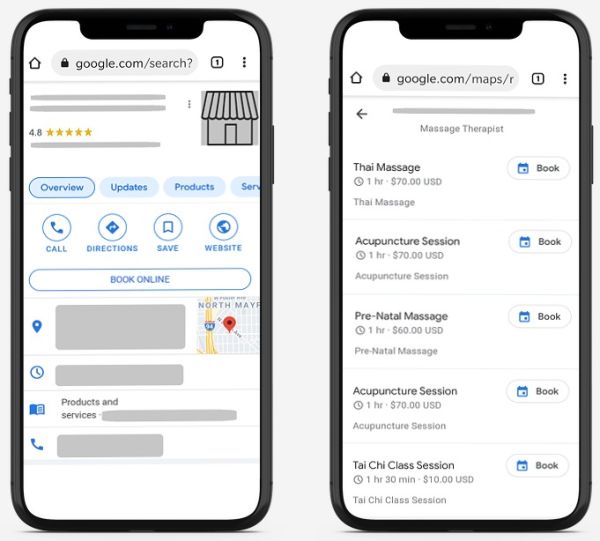
The button does not appear on its own. Google shows it only when the business uses a booking provider that Google has partnered with. A booking provider is the scheduling software that holds the spa’s calendar, tells Google which appointment times are free, and receives the booking once the client completes it.
For a spa owner, that flow contains three practical facts. The client never has to find or load the spa’s website, which removes the step where most mobile bookers give up. The booking is a real booking, not an enquiry, because it lands on the calendar as a confirmed appointment with the client’s details attached. And the spa does not run a second system, because spa bookings from Google sit on the same calendar as bookings from the website, the phone and the front desk.
How a Google Booking Flows into Your Spa Calendar
The simplest way to understand Reserve with Google for spas is to follow one booking from start to finish. The flow has four stages, and each depends on the one before it.
- Your calendar supplies the free times. The booking software holds the spa’s services, the therapists assigned to each service and the working hours of each therapist, and from that information it works out which appointment times are genuinely available. This is what “real-time availability” means: the times shown to a client are the times the spa’s software says are free at that moment, not a fixed list typed in once a week.
- Google shows those times on the listing. When a client taps the booking button on the spa’s Google listing, Google displays the treatments the spa has made available and the open times for them, drawn from the spa’s calendar.
- The client selects a time, completes the booking and, if the spa requires it, pays. For online spa bookings made this way, the client picks the treatment and the time, enters their details, and completes any payment or deposit the spa has set as a condition of booking.
- The booking lands on the spa’s calendar. The appointment is created automatically, the time is removed from availability so nobody else can take it, and the automatic confirmation and reminder messages the spa already uses for website bookings apply to this booking as well.
The dependency between these stages explains why the setup inside the booking software matters more than the setup inside Google, because Google can only show what the booking provider sends it. If a therapist’s hours are wrong in the calendar, Google will offer a time that therapist cannot work. Accurate Google Maps spa bookings are therefore the product of an accurate booking calendar.
What a Spa Needs First: a Google Business Profile and a Partner Booking System
Two requirements must be met before the Book button can appear, and both are the spa owner’s responsibility, not Google’s.
The first requirement is a claimed and verified Google Business Profile. Claiming means the spa owner has established control of the business listing, while verification means Google has confirmed the owner’s association with the business through its verification process. Many established spas already have a Google listing, often created from publicly available information. However, an existing listing does not automatically mean the owner controls it. Before proceeding, the spa owner should check that the profile is claimed and verified, as they cannot manage the booking integration through a listing they do not control.
The second is an appointment booking software that is a Reserve with Google partner. This is the part that is easy to misjudge. A spa can have excellent appointment software and still have no route onto Google, because Google only accepts availability from providers it has partnered with. When comparing spa booking software, ask each provider two direct questions: Are you a Reserve with Google partner, and can you show me where to enable the integration in my account? This helps confirm both that the provider supports the feature and that you can activate it from your own account.
Beyond those two requirements, the preparation is about the calendar itself: the durations and prices of the spa’s services, which staffers are assigned to each service, and each staffer’s working hours. Each of these settings feeds the availability Google displays, so each should be checked before the channel goes live.
Which Spas Are Eligible for Reserve with Google
Eligibility is set by Google, not by the booking provider, and it is narrower than many spa owners expect. When the integration launched in 2021, the supported categories were wellness and fitness services, spa and beauty services, and financial services, and a second restriction applied that still matters: only specific services and countries are eligible to use Reserve with Google.
Spas sit squarely inside the spa and beauty services category, which is why Reserve with Google for spas has been a natural fit from the beginning. The country restriction is the one to check: a spa in a country where Google does not operate the feature cannot use it regardless of which spa booking software it runs, and the only reliable way to confirm current coverage is Google’s own information for the spa’s country, because the list has changed over time. The specific-services restriction means that not every treatment a spa sells is necessarily bookable through Google even in an eligible country, so a spa should expect to choose which treatments to expose to the channel rather than assume the whole menu will appear. That choice is the subject of the next section.
Which Treatments to List on Google, and How to Prepare the Menu
The question of which treatments to list is where a spa’s operational reality meets the channel. Spas run on resource allocation rather than simple time slots: each appointment needs both a qualified provider and an equipped treatment room, so a hot stone massage reserves a therapist and a room with a stone warmer at the same time. That matters for Google bookings because Google sees only the availability the calendar sends it, so a treatment whose availability depends on something the calendar does not represent can look open when it is not.
The sensible response is to list for Google Maps spa bookings only the treatments whose availability the calendar can state with confidence, and to prepare each one with care.
- Start with treatments that depend on a therapist’s time alone. A classic Swedish massage, a facial or a body scrub that any trained therapist can deliver in any room is the cleanest candidate, because its availability is fully described by the therapist’s working hours and the service’s duration.
- Set the duration to include turnover. An automatic time gap between slots gives the therapist time to get ready for the next client. A sixty-minute massage that needs ten minutes to change linens and reset the room should be configured so that Google never offers the next client a start time inside those ten minutes.
- Assign the right therapists to each service. If a deep tissue massage can be performed by two of five therapists, the service should be assigned to those two in the calendar, so that spa bookings from Google are offered only at times when one of them is free.
- Set the price Google will display. The price shown to a client booking from Google should match the spa’s own menu, because a mismatch creates a difficult conversation at the front desk.
- Hold back treatments that need a consultation first. Advanced skin treatments, anything requiring a medical history, or a couples treatment that depends on two therapists and a specific room are better handled through a channel where the spa can speak to the client before confirming, at least until the spa is confident in how the calendar represents them.
Therapist selection is a setting of the spa’s own booking page; before promising clients that they can choose a named therapist when booking from Google, a spa owner should run a test booking from a phone and confirm how the choice appears in the Reserve with Google flow for their account.
Deposits and Payments on Spa Bookings That Come from Google
A spa owner’s first worry about any new booking channel is usually the no-show, because a booking that costs the client nothing to make and nothing to abandon is a booking the spa cannot fully rely on.
The owner can require online payment or deposits to confirm online bookings, or collect card details instead, or let the client decide whether to pay at the time of booking or at the spa. The owner can also set terms and conditions and a cancellation policy that clients must accept to complete a reservation, and set taxes and any additional fees so that they are applied automatically to the price.
For spa bookings from Google, this gives the owner one clear decision before switching the channel on. A deposit requirement protects the spa’s time, and because it is applied through the booking software’s settings it covers Google bookings as well as website bookings. A spa that sells high-value treatments or has a history of late cancellations will generally require a deposit, while a spa trying the channel for the first time might start with card details on file and tighten the rule once it has a few weeks of bookings to judge by.
One point follows from how the payment is processed. The money moves through the payment gateway the spa has already connected to its booking software; a payment gateway is the service that takes a card payment online and passes the money to the business’s bank. The spa therefore does not open a new payment account for Google bookings, and the same card-processing arrangement applies whichever channel the booking arrived through.
Fees and Costs: What to Check Before You Switch On Google Bookings
A spa owner evaluating Reserve with Google for spas will reasonably ask two separate cost questions: what Google charges, and what the booking software charges. They should be kept separate because they are answered by different companies.
On Google’s side, the terms for the booking button are set by Google, can differ by country and can change over time, so the correct step is to read Google’s current terms for the spa’s country before enabling the feature.
The remaining cost is time. Preparing the treatment menu, checking therapist hours and deciding the deposit rule are the real investment, and a spa that spends an afternoon on them before switching the channel on will spend far less time afterwards correcting bookings that should never have been offered.
Why Google Maps Bookings Matter for Walk-In-Heavy Spas and Mobile Searchers
Some spas run on appointments made days in advance; others, particularly in city centers, shopping districts and hotel areas, depend on people who decide today that they want a treatment today. For the second kind of spa, Google Maps spa bookings are not a convenience but a direct answer to how their clients already behave.
Consider the person who is nearby, has an hour free, and opens Google Maps to look for a spa. This person is standing where a walk-in would stand, except that they are deciding on a phone before they arrive. If the listing they find shows a Book button with an open time in twenty minutes, they can confirm it and walk over knowing a therapist is waiting; if the listing shows only a phone number, they must call, wait, and describe what they want to a receptionist who may be with another client, and many will instead choose the listing that let them book. The BrightLocal finding cited at the top of this article, that a meaningful share of consumers begin their local search inside Google Maps, is the reason the Book button on Google matters more for a walk-in-heavy spa than for almost any other kind of business: the client is already in the map, already close, and ready to buy.
The same reasoning applies to mobile searchers planning for later in the week, because a phone screen punishes every extra step. A spa whose booking page already lets clients view real-time availability, schedule their own appointments and pay on any device serves mobile clients well; the Google channel reaches the ones who never get as far as that page. For a walk-in-heavy spa there is also an operational benefit, because a same-day booking made through Google twenty minutes before arrival is still short notice, but it is notice, with a name, a treatment and a time attached, which lets the front desk prepare a room rather than scramble when the door opens.
Setting Up Reserve with Google in Bookeo
In Bookeo the setting sits under Marketing, then Distribution Channels, then Reserve with Google, next to the other distribution channels through which clients reach the spa’s calendar, rather than among technical settings. That placement is the right frame for a spa owner as well: this is a channel for finding new clients, to be switched on deliberately and measured like any other source of bookings.
A sensible order of work is as follows.
- Confirm the Google Business Profile is claimed and verified. Without it there is nothing for Google to attach the button to.
- Review the calendar. Check each therapist’s working hours for each spa location, which therapists are assigned to which treatments, the duration and price of every treatment that will be listed, and whether the time gap between slots reflects real turnover time.
- Decide the payment rule. Choose whether Google bookings will require a deposit, full payment, card details on file, or allow the client to pay at the spa, and set the cancellation policy clients must accept.
- Open Marketing, then Distribution Channels, then Reserve with Google. Fill in the required details; the in-account tutorial on the integration explains each field.
- Test from the client’s side once the button appears. Search for the spa on Google Maps on a phone, tap the button, walk through a booking as a client would, check that the treatments, times and prices match the spa’s menu, then confirm that the test booking appears on the spa’s calendar and that the confirmation message arrives.
The time Google takes to show the button after setup is controlled by Google’s own review process, so a spa owner should allow for a review period and not announce the new channel until the button is visible and has been tested.
Measuring the Spa Bookings You Get from Google
A channel that cannot be measured cannot be judged, and a spa owner needs to know whether Reserve with Google for spas is producing new clients or simply moving existing clients from one booking route to another. Reports that compare bookings and revenue across months, together with staff utilization and appointment performance figures, are the natural starting point.
The practical method is a before-and-after comparison. Record the spa’s total online spa bookings, the number of new clients, and the revenue from the listed treatments for the month before the channel goes live, then compare the same figures for the first full month afterwards; a rise in new clients that coincides with the launch, especially for the treatments listed on Google, is the clearest sign the channel is working. The client database, which keeps each client’s contact details and appointment history in one place, lets the front desk note how a new client first found the spa, and a short question at check-in turns that note into usable data over a few weeks.
Two further measures matter specifically for spa bookings from Google. The first is the no-show rate on those bookings compared with the spa’s usual rate, because that comparison shows whether the deposit rule is set correctly for this channel. The second is the share of same-day bookings, which shows whether the channel is reaching the nearby, ready-to-buy client described earlier. If same-day bookings rise and their no-show rate is acceptable, the spa has gained walk-in demand it can staff for.
Measurement should then feed back into the menu: if one treatment draws most of the Google bookings, a closely related treatment may be worth adding, and if a treatment draws bookings that are frequently rescheduled, its duration or therapist assignment may need adjustment. The calendar settings are where each adjustment is made.
Frequently Asked Questions
Is Reserve with Google free for spas?
The cost has two parts set by two different companies. Google’s terms for the booking button are Google’s to set and can vary by country, so a spa owner should read Google’s current terms for their country before enabling the feature. On the software side, a subscription that is a fixed monthly fee with no commission per booking does not increase because bookings arrive through Google. Card-processing charges from the spa’s payment gateway apply to online payments from any channel.
Do I need a website to use Reserve with Google?
The booking happens on the spa’s Google listing, so the client does not need to visit a website to complete it. A website remains useful for presenting the full treatment menu and the spa’s policies, and a standalone booking page provided by the booking software can serve as a booking destination for a spa that has no website at all.
Can clients book a couples massage or a specific treatment room through Google?
Availability shown on Google is calculated from therapist assignment, working hours, durations and prices set in the calendar, so a spa offering couples treatments should run a test booking and confirm how that treatment appears before listing it on Google.
How long until the Book button appears after setup?
The review is carried out by Google and the timing is Google’s. A spa owner should allow for a waiting period after completing the details under Marketing, Distribution Channels, Reserve with Google, and should test the button from a phone before telling clients about it.
Can I try spa booking software before paying?
Spa booking software is normally available on a free trial, and the trial is the right time to set up the calendar, treatments and therapists, switch on the Google channel and run a test booking from a phone before subscribing.
Key Takeaways
- Reserve with Google puts a Book button on the spa’s Google listing. Clients book in Google Search or Google Maps without visiting the website, and the booking lands on the spa’s calendar automatically.
- The button requires two things. A claimed and verified Google Business Profile, and spa booking software that is a Reserve with Google partner.
- Eligibility is set by Google. Spa and beauty services were among the supported categories from the start, but availability depends on the service and the country.
- Google shows only what the calendar sends. Therapist hours, service assignments, durations, prices and the time gap between slots must be accurate in the booking software before the channel goes live.
- Deposits apply to Google bookings. A rule that requires online payment or a deposit to confirm online bookings governs Google bookings as well, and a client booking from Google pays online where the spa requires it.
- Set it up under Marketing, Distribution Channels, Reserve with Google. Then test the whole flow from a phone, and measure new clients, same-day bookings and no-show rates before and after.
Conclusion
The person searching for a spa on their phone has already done the hard part of marketing for you: they want a treatment, they are close, and they have found your listing. What decides whether they become your client is how many steps stand between that moment and a confirmed appointment. Reserve with Google removes most of those steps by placing the booking inside the listing itself, and a booking provider partnered with Google makes the spa’s real availability visible there. The spa’s work is to make the calendar accurate, choose the treatments it can honor, set a deposit rule that protects its time, and then measure what the channel brings in, so that Google bookings become one more reliable source of appointments on a calendar the spa already trusts.
For spa owners and managers who want to take spa bookings from Google Search and Google Maps on the same calendar that handles their website, phone and front-desk appointments, Bookeo provides spa booking software with a Reserve with Google integration, online deposits and payments, automatic confirmations and reminders, and a 30-day free trial with no credit card required.