
Choosing Massage Booking Software: Five Questions to Ask Before You Decide
Much massage booking software looks alike on a feature grid. Every product claims online booking, reminders, payments, and a client database, so a comparison of feature lists rarely tells a therapist which system will actually suit the way the practice runs. What separates a good fit from an expensive mistake is how the software answers a small number of operational questions: how clients book and pay, how the practice is protected when a client does not arrive, whether rooms need scheduling as well as therapists, how clients are brought back, and what the system will really cost to run and to switch into.
This guide works through those five questions in order. Each one ends with a plain rule: if the answer is yes, you need a specific capability; if it is no, you can skip it and keep your shortlist simpler. The guide deliberately compares no named vendors. If you want a broader checklist of the features a practice needs, start with our earlier guide to choosing a scheduler and come back here when you are ready to decide.
A Few Terms to Settle First
Software vendors use the same words in slightly different ways, so it helps to fix their meaning before comparing systems side by side. These are the terms the rest of this guide relies on.
Deposit: a part payment taken at the moment of booking, with the balance paid later, either online or at the appointment.
Card on file: the client’s card details captured securely during booking without an immediate charge, so a fee can be applied later if the cancellation policy allows it.
Deferred payment: an option that lets the client choose whether to pay now or later, usually with a default set by the business.
Cancellation fee rules: a structured policy in which the massage booking system calculates fees automatically based on how close to the appointment a client cancels.
Resource: anything that must be free for a booking to happen. In a massage practice, that usually means a therapist and a treatment room.
Prepaid credit: one visit bought in advance as part of a package and deducted when the returning client books.
Membership: an enrolment, paid once or on a recurring schedule, that gives access to member prices, members-only services or included sessions.
Gift voucher: a code one person buys for another. A generic voucher holds a monetary value; a specific voucher is tied to one named service.
Changeover date: the date that divides your bookings between two systems: bookings before it go to your old booking page, and bookings on or after it go to the new system.
Question 1: How Do Your Clients Want to Book and Pay?
The short answer: choose a system that matches the booking channels your clients already use and lets you set payment terms service by service rather than once for the whole practice.
Start with channels. A massage practice typically receives bookings in three places: its website, links shared in emails or messages, and its listing on a map or search engine. A good booking system for massage therapists covers all three without making the client feel they have left your brand. Look for a booking widget that embeds directly inside a page of your site, a standalone booking page you can share if you have no website, and buttons or direct links that open the booking flow at a specific service.
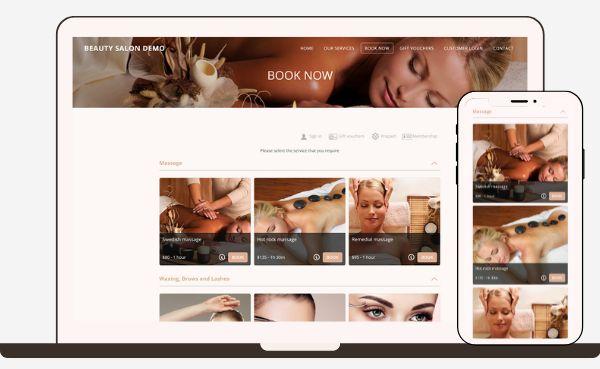
The search listing deserves its own check. Where a booking system supports the Reserve with Google integration, a Book Online button appears on your listing in Google Search and Google Maps. In Bookeo, the integration needs a verified Google Business Profile, services set up in the account and the integration enabled; for eligible services and countries, a Book Online button then shows on the listing, and bookings made there land in the Bookeo calendar with the therapist and room already assigned. Whatever system you evaluate, ask the same question: when a client books from a search listing, does the appointment land in the same calendar as every other booking, or in a separate inbox someone has to reconcile?
Payment is where massage practices differ most. Some therapists want full payment at booking, some prefer a deposit, some only want a card held as security, and many still take payment in the room after the session. The right massage appointment software lets you choose your own payment terms. Bookeo, for example, sets payment terms in Settings > Online Payments, with four choices: full online payment, a deposit, card details only, or no online payment. A deferred payment setting lets the client decide between paying now and paying later, with a default you choose, and a Pay Balance button lets the client pay the remaining balance online. Alongside online payments and deposits, in-person tap and swipe payments taken through an integrated POS payment system are recorded in the same calendar, and cash payments can be tracked there as well.
Intake belongs in this question too, because the booking flow is where most practices first collect health information. The American Massage Therapy Association explains in its guide to a massage session that the therapist will ask preliminary questions to determine the client’s overall health and wellness goals. In practice, that means deciding which questions your massage booking software asks during booking and which are asked later. Keep the booking form short: some systems hold the chosen time slot only for a limited period while the client completes checkout (in Bookeo, 10 minutes), and a long questionnaire at that moment risks losing the slot and the client.
Finally, check the phone experience. Many massage clients book from a phone, often late in the evening. The booking interface of any massage scheduling software you consider should adapt to the screen without asking the client to download an app.
The rule: if you take any money before the appointment, or plan to, you need per-service payment terms, a deposit option and a balance payment link. If every client pays in the room and you are comfortable with that, you can skip online payments for now and focus on channels.
Question 2: How Will the Software Protect Your Income From No-Shows?
The short answer: reminders reduce forgetting, but only a cancellation policy the client accepts at checkout, combined with a card or deposit held against it, protects the income from a slot that goes empty.
Practice owners who shop for massage booking software tend to describe the problem in one breath: they want deposits and reminders together. That instinct is correct, because each mechanism covers a different failure. A reminder deals with the client who forgot. A deposit or a card on file deals with the client who decided not to come. A system that offers only one of the two leaves half the problem open.
Begin with reminders. Check whether you can set the timing yourself, because a practice that books mostly a week ahead needs a different reminder window from one that fills same-day slots. A sensible arrangement separates the two channels: email reminders sent at a time you choose, and text reminders paid for with purchased SMS credits, so the cost of texting scales with how much you actually use it. Ask any vendor the same two things: who controls the timing, and how text messages are paid for.

Then look closely at the cancellation policy, because this is the area where feature lists for massage booking software are least reliable. Two very different things are often described with the same words. One approach displays a policy and leaves enforcement to you. The other enforces the policy itself.
Bookeo offers both, and the difference between them illustrates what to ask any vendor. Every client who books online must accept the policy before the booking is confirmed. In Rules mode, you define a standard fee and time-based fees, and when a card is on file the software charges the applicable fee automatically. It also calculates any refund due and sends you a notification, leaving the decision to issue that refund with you. In Custom text mode, the client sees and accepts your own policy wording, and fees are handled at your discretion. A therapist who wants firm, automatic enforcement chooses rules; a therapist who prefers to judge each case personally chooses custom text and still benefits from a policy the client has formally accepted.
Two further features are worth confirming in any booking software for massage therapists. Clients should be able to reschedule or cancel online themselves, because a client who can move an appointment easily is less likely to simply not turn up. And staff notifications should be configurable by email or text, so the therapist whose afternoon has just opened up knows straight away.
The rule: if a missed 60-minute session costs you money you cannot recover, you need a cancellation policy accepted at checkout, a card on file or deposit, and fee rules that the software applies itself. If your clients are mostly long-standing regulars and missed visits are rare, adjustable reminders and online rescheduling may be enough.
Question 3: Do You Need to Schedule Rooms as Well as Therapists?
The short answer: once you have more than one therapist or more than one treatment room, you need massage scheduling software that treats both as resources and only offers a time when every resource the service needs is free.
A solo therapist with one room can work from a simple time-slot calendar. The moment a second therapist shares the space, or a room has equipment only some services require, a time-slot calendar starts producing bookings that cannot physically happen. The classic example is a pregnancy massage that needs the room with the pregnancy table: if the software does not know which room holds that table, it can book the service into a room without one.
Resource-based massage scheduling software solves this by modelling the practice as it really is. In Bookeo, resources are organised into types, such as Therapists and Rooms, and each type contains named resources, such as an individual therapist or Room 1. Every resource carries its own weekly hours or follows business hours, can have special available time slots, and can be marked unavailable for periods such as leave. A booking is possible only when the service and every resource it needs are free at the same time, which is exactly what prevents the pregnancy massage problem described above.
When you evaluate any massage booking system, check four settings in particular.
- Service-to-resource rules: you should be able to say which therapists and rooms each service can use. The most flexible systems let you assign all resources, only selected resources, or all but selected resources to each service.
- Client choice: some clients want a named therapist; others want the earliest slot. Look for the ability to show therapists to clients, let them pick one, and offer a first available option.
- Buffer time: look for an automatic time gap between appointments, so each therapist has time to reset the room before the next client.
- Fair distribution: when the client does not choose, the software decides. Automatic selection modes such as least recently used over the last 7 days spread work fairly across a team rather than loading the first name on the list.
Day-to-day control matters as much as setup. Therapists who are not managers should still be able to block their own lunch break or a personal appointment without changing the general schedule, and a blocked therapist should not be bookable. Account permissions should let you give each person read or write access to the right calendars, and every change to a booking should record who made it. If each therapist keeps a personal calendar, a two-way calendar sync gives them a single daily view.
Growth to a second location is the last part of this question. Ask how the vendor handles it: some practices keep one account and treat each location as an option or a resource, while others prefer a separate account per location with its own branding, payment gateway and reports. Both are legitimate; the important thing is that the vendor can describe exactly which data is shared and which is not.
The rule: if you have two or more therapists, two or more rooms, or any service tied to specific equipment, you need resource-based scheduling with service-to-resource rules. If you work alone in a single room, a straightforward availability calendar will do, and you can revisit this question when you hire.
Question 4: How Will the Software Help Clients Come Back?
The short answer: retention in a massage practice depends on prepaid packages, memberships, gift vouchers and review follow-ups, and the booking software for massage therapists you choose should handle each of them without manual adjustments by staff.

Regular massage clients are the most valuable clients a practice has, yet many massage booking systems treat every visit as a separate sale. Five tools change that, and each deserves a specific test.
- Recurring bookings: a client on a treatment plan every two weeks should be able to reserve the whole series at once. Check whether both clients and staff can create the series, and whether each visit appears as its own appointment.
- Prepaid packages: the familiar offer of a bundle of sessions at a reduced price per visit works only if the credits apply without staff intervention. Credits should be deducted automatically when a returning client signs in or when staff select the client’s profile, and one package should be able to cover several services. Check how the system treats extras added on top, such as a scalp massage; paying for them separately keeps the package value clear for both sides.
- Memberships: in any massage appointment software you shortlist, check whether rates can be charged once upfront or on a recurring schedule, and what benefits are available. Member prices, members-only services and included sessions are the usual options, and a well-designed membership can also include prepaid credits with each payment. Ask whether staff can pause a recurring membership with a restart date, which matters when a regular client travels or recovers from an injury. Confirm also that your chosen payment gateway supports recurring payments.
- Gift vouchers: look for both types. A generic voucher holds a money value and can be spent on any service, with any unused balance staying as credit on the redeeming client’s account. A specific voucher is tied to one named treatment, such as a 60-minute Swedish massage, and is priced at the highest price set for that service. Vouchers should be sellable online and at the front desk from the calendar.
The final retention tool is the review request, and good massage scheduling software sends it for you. Automated follow-up emails after an appointment, asking for feedback or a public review, are what turn a satisfied client into visible social proof without anyone on the team having to remember to ask.

There is one point of judgement here. A practice does not need every retention tool on the first day. Packages tend to suit therapists whose clients come for a course of treatment, memberships suit practices with a stable base of monthly regulars, and vouchers matter most to practices with strong seasonal gift demand. Choose massage booking software that offers all of them, but switch on only the ones your client base will actually use.
The rule: if more than a handful of your clients return on a predictable schedule, you need recurring bookings plus either packages or memberships that apply automatically. If you sell gifts at holiday periods, you need generic and specific vouchers. If most of your work is one-off visits from new clients, prioritise review follow-ups and leave packages for later.
Question 5: What Will It Really Cost, and How Easy Is the Switch?
The short answer: compare the monthly subscription, the per-booking charges and the payment processing fees as three separate numbers, then ask exactly which records can be moved across and how existing future bookings will be handled.
Pricing models for massage booking software fall into a few patterns: a flat monthly subscription, a subscription plus a commission on each booking, a fee charged to the client at checkout, or a per-staff charge. The headline monthly price rarely tells the full story, so ask every vendor three questions in writing. Does the company take a commission on bookings? Is any fee added to the price your client pays? And which payment gateways can you connect, given that each gateway charges its own processing fees?
In Bookeo, plans are sized by the number of consultants, staff logins and bookings per month, and a booking counts once per reservation, so a booking for several people counts as one. Because prices vary by region and change over time, the clearest place to compare is the page listing current plans and add-ons. Two extras sit outside the plan price: digital waivers, which are a paid add-on, and text reminders, which use purchased SMS credits. Practices with a quiet season can freeze the account at 30% of the regular fee, keeping every setting in place while new bookings are paused.
Trial terms are the next filter. A trial is only useful if it gives the practice time to run a realistic test. Look for a trial that runs for a full month without asking for a card, ideally backed by a money-back guarantee after you subscribe, because that gives a therapist a full booking cycle to test before committing.

Switching is the part of this question most buyers forget until it is too late. Ask each vendor on your list precisely what can be imported. Client lists usually can, typically from a spreadsheet template, a CSV contacts export or a vCard file, with any custom field columns named to match the fields in the new account. Future bookings are handled differently, and the cleanest method is a changeover date: appointments before that date go to the old booking page, while bookings on or after it go to the new system. Upcoming appointments can also be entered manually where that is simpler. Settings are then configured in the new account, so ask whether technical setup support is free and whether a paid setup service exists for practices that would rather hand the work over.
There is a lesson here that applies to every vendor. Practice owners sometimes arrive at a new system carrying generic setup instructions they found online, and those instructions often describe menus or steps that do not match the software in front of them. The fix is simple: during a trial and a migration, follow the vendor’s own current help articles and support team rather than general advice, because menu paths and options change and only the vendor’s documentation reflects the live product.
The rule: if you are switching from another massage booking system, you need a client import path, a changeover option for future bookings and a vendor that gives setup support at no extra charge. If you are starting from scratch, focus on the cost model and the trial terms, and confirm that the pricing does not rise with every booking you take.
A One-Page Scorecard for Your Shortlist
The table below condenses the five questions into a form you can use during demos and trials. Score each massage booking system against the middle column and treat anything in the right-hand column as a reason to look harder.
| Question | What a good answer looks like | Red flag |
|---|---|---|
| How do clients book and pay? | Embedded widget, standalone booking page and search listing all feed one calendar; payment terms: deposit, card on file, deferred payment and online balance payment available | Search listing bookings arrive somewhere other than the main calendar |
| How are no-shows handled? | Reminder timing you control; text reminders available; cancellation policy accepted at checkout; fee rules applied automatically to a card on file; refunds calculated and flagged for your approval | A policy that is only displayed text with no enforcement option; reminder timing fixed by the vendor |
| Are rooms scheduled as well as therapists? | Therapists and rooms as separate resource types; service-to-resource rules; client choice of therapist or first available; staff can block their own time | Rooms tracked in notes or a separate calendar; double booking of a room is possible |
| How do clients come back? | Recurring bookings; prepaid packages and memberships applied automatically; generic and specific gift vouchers; automated review follow-ups | Package credits deducted by hand; vouchers handled as manual discounts |
| What does it cost to run and to switch? | Flat subscription with no commission; gateway fees separate and transparent; trial without a card; client import from file; changeover date for future bookings; free setup support | Commission or client-facing fee per booking; no clear answer on what can be imported |
A practice does not need every cell in the middle column to be filled. Use the rule at the end of each question to decide which rows matter for you, and ignore the rest.
Questions to Ask During a Free Trial
A free trial of massage booking software is the only place where a feature list becomes evidence. Feature claims in general articles and roundups are frequently out of date or simply describe a capability the product does not offer, and buyers who act on them discover the gap only after they have committed. Treat every claim as unconfirmed until you have carried it out yourself in a trial account. These five tests reveal more than any demo.
- Make a deposit booking on your phone. Book a 60-minute massage as a client would, from a phone, and pay the deposit. Note how many screens it takes, whether the policy appears before payment, and whether the confirmation email looks like your practice.
- Cancel outside and inside the policy window. Cancel one test booking well before the cut-off and another inside it. Check that the software treats them differently and that you can see what fee, if any, applies and what refund is due.
- Check the reminder. Set a reminder timing, make a booking that falls inside it and confirm the reminder arrives when expected, by email and, if you plan to use it, by text.
- Block a therapist’s lunch. Sign in as a non-manager staff member, block an hour for lunch and then try to book that therapist during the blocked hour from the client side. The slot should not be offered.
- Sell a test gift voucher. Buy a specific voucher for one named treatment online, then redeem it against a booking. Confirm the price, the expiry and how the balance or the service is applied.
If a massage scheduling software trial does not let you complete all five tests, ask the support team to walk you through the missing steps. How quickly and clearly they answer is itself part of the evaluation.
Where Bookeo Fits
Bookeo is an online appointment booking software built for independent massage therapists, multi-therapist clinics and spas that want to take bookings and payments online without paying a commission on each appointment. Of its three product lines, the appointments product is the one designed for service businesses such as massage practices.
Measured against the five questions, the fit looks like this. For booking and payment, the widget, standalone booking page, and Reserve with Google integration feed one calendar, and payment terms let you choose between deposits, card details, alongside deferred payment and online balance payment.
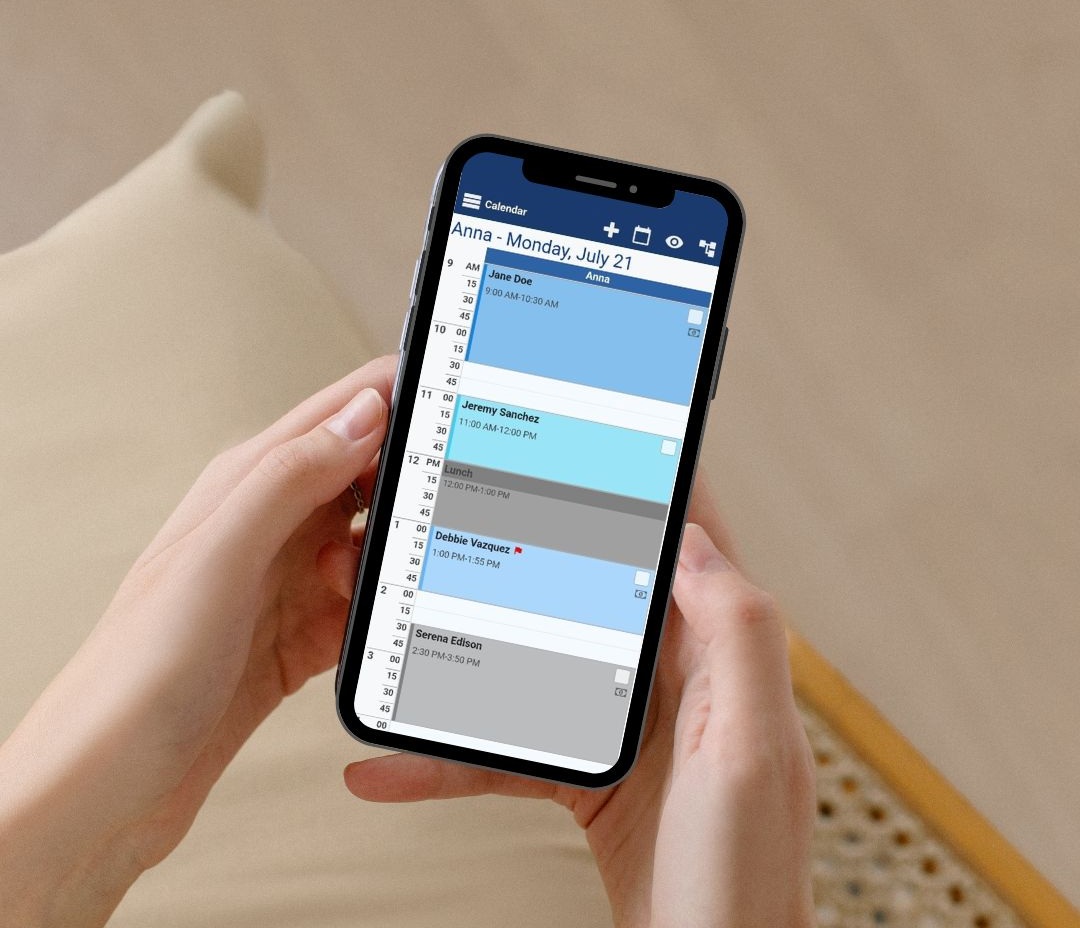
For no-shows, adjustable email reminders, credit-based text reminders, and a cancellation policy with an automatic Rules mode work together. For massage practices with several rooms, therapists and rooms are scheduled as separate resource types with service-to-resource rules and first available selection. For repeat clients, recurring bookings, prepaid packages, memberships, generic and specific gift vouchers and review follow-up emails are built in.
Health history and consent can be collected during booking or through digital waivers, a paid add-on that clients can sign online before the visit, with signed forms attached to the client record.
For cost, this massage booking software uses a flat month-to-month subscription, plans are sized by consultants, staff logins and monthly bookings, and the 30-day free trial does not ask for a card, with a 30-day money-back guarantee on the main subscription once you subscribe. Client lists can be imported from a spreadsheet, CSV or vCard file, and the changeover date setting in Account > Account migration sends bookings on or after the date you choose to Bookeo and earlier ones to your old booking page, with free technical support during setup.
Frequently Asked Questions
Is massage booking software worth it for a solo therapist?
It depends on how you answer the five questions. A solo therapist who takes deposits, loses income to late cancellations or sells packages will usually recover the cost of massage scheduling software quickly through fewer empty slots and less time spent on messages. A therapist who works only with long-standing regulars who pay in the room may need little more than reminders. Bookeo’s plans start with a Solo tier sized for a single practitioner, so compare the smallest tier on each shortlist rather than the headline plan.
Does massage booking software charge a fee per booking?
Pricing models differ. Some systems take a commission on each booking or add a fee to the client’s checkout, while others charge a flat monthly subscription. Bookeo charges a monthly subscription with no commission on bookings, and the payment gateway you connect charges its own card processing fees, so it is worth comparing all three costs together.
Can massage clients fill in health forms online?
Yes. Most massage booking software lets you add intake questions to the booking form, and some products also offer digital waivers or consent forms that the client signs before the appointment. In Bookeo, health history can be collected through custom fields at booking or through a digital waiver signed before the visit, with contraindications, medications and pressure preferences kept on the client record. Digital waivers are a paid add-on.
Can I move my client list from my current system?
Usually, yes. Client records are normally imported from a spreadsheet, a CSV file or a vCard file. Future appointments are a separate matter: a changeover date sends bookings before that date to your old booking page and bookings on or after it to the new system, and your settings are rebuilt in the new account, ideally with the vendor’s setup support.
Do clients need to download an app?
No. A good booking interface adapts to phones and tablets in the browser, so clients book from the link or widget without installing anything. The administration side should also work on a phone, so you can check the day’s schedule between sessions.
Key Takeaways
- Feature lists for massage booking software look alike; five operational questions about payments, no-shows, rooms, retention, and cost decide the real fit.
- Set payment terms and look for deposits, card on file, deferred payment, and an online balance option.
- Reminders reduce forgetting, but only a cancellation policy accepted at checkout, backed by a card or deposit and enforced by fee rules, protects income.
- Any practice with more than one therapist or room needs resource-based scheduling with service-to-resource rules.
- Packages, memberships, gift vouchers and review follow-ups should apply automatically, not through manual discounts.
- Compare subscription, commission, and gateway fees separately, and confirm the import path and changeover option before you switch.
- Verify every claimed feature yourself during a trial, using the vendor’s own current help articles rather than generic instructions.
Conclusion
Choosing massage scheduling software becomes much simpler once you stop comparing feature lists and start answering the five questions that reflect how your practice actually works. Decide how clients book and pay, how strictly you want to enforce your cancellation policy, whether rooms need scheduling, which retention tools your regulars will use, and what the full cost of running and switching will be. Then use the scorecard and the five trial tests to confirm that the system you choose does what it claims. If you want to run those checks on a live account, Bookeo provides massage booking software for independent massage therapists, spas, and multi-room clinics, with a 30-day free trial that does not require a card.